Summary
Editor's rating
Is it worth the money compared to VR headsets and other AR glasses?
Looks and build: more chunky glasses than sci‑fi helmet
Power and practicality: no battery in the glasses, but your devices pay the price
Comfort and fit: light on the nose, picky with IPD and eyesight
Build strength and long‑term worries
Picture, tracking and audio: great for media, mixed for text
What you actually get and how it works in real life
Pros
- Very good image quality for movies and games with deep blacks and 120 Hz
- Light and comfortable enough for long media sessions compared to any VR headset
- Strong on‑board features (3DoF, follow mode, quick controls) that work with almost any USB‑C video device
Cons
- Lens distortions and edge softness make long text or productivity work tiring
- Total cost climbs quickly if you need prescription lenses or a hub
Specifications
View full product page →| Brand | XREAL |
AR glasses that are more TV than headset
I’ve been using the XREAL One Pro for a couple of weeks as my “portable screen” for flights, couch gaming and some light laptop work. I already own a Quest 3 and I’ve tried Vision Pro, so I wasn’t expecting a full mixed reality setup here. And that’s the first thing to understand: these are basically a big floating monitor on your face, not a VR headset replacement. Once you see them that way, they make a lot more sense.
The model I used is the L size (IPD 66–75 mm). I’m around 69 mm IPD, so I’m right in the middle of that range. I mainly plugged them into a Steam Deck, a Windows laptop and an Android phone with DisplayPort. No extra apps, just USB‑C video out. They also work with iPhone 15/16 via USB‑C, but you still need the right cable or hub depending on what you want to do.
My typical use: Netflix and YouTube on the sofa, a couple of flights, some remote desktop coding sessions, and a bit of PS5 via remote play from the laptop. So a mix of fun and “pretend productivity”. Overall they did the job really well for movies and games, and only “okay” for serious work. Some of that is the optics, some of that is just the nature of 1080p per eye pretending to be a 171‑inch screen.
If you go in thinking this will replace a proper monitor for long text sessions, you’ll probably be let down. If you want something light that makes your phone or Steam Deck feel like it’s hooked to a big OLED TV, then it starts to look like a pretty solid toy for travel and small apartments. That’s basically where I landed with them.
Is it worth the money compared to VR headsets and other AR glasses?
Price‑wise, the XREAL One Pro sits in that awkward middle ground. It’s not cheap, especially once you factor in potential extras: prescription lenses if your eyesight isn’t perfect, maybe an XREAL hub if you want more flexibility, and possibly a better cable. By the time you add those, you’re not miles away from the price of a Quest 3 or even some lower‑end laptops. And unlike a VR headset, these glasses don’t give you a full app ecosystem, controllers, or proper VR games. So if you think of it as “VR but weaker”, the value looks poor.
But that’s not really the fair comparison. The right way to see them is as a portable monitor or portable cinema. Compare the price to a decent 24‑32 inch OLED monitor or a travel monitor plus good headphones, and it starts to look more reasonable, especially when you factor in that you can use them with multiple devices: phone, Steam Deck, laptop, console via PC, etc. For frequent travellers or people in small flats who can’t have a big TV, the convenience is the main selling point. Being able to watch a “large” screen in bed, on a plane, or in a hotel without lugging anything big is where they earn their keep.
There’s also the competition: VITURE Pro and other AR glasses in the same price range. Based on my tests and the reviews, XREAL has better on‑board features (3DoF stability, follow mode, 2D‑to‑3D, quick settings on the glasses) but slightly more lens distortion for text than some rivals. So if you’re focused on media and want the extra tracking features, XREAL is a strong option. If you care more about reading and productivity, there might be better choices for the same money.
In the end, I’d call the value “good but not cheap”. If you have the cash and a clear use case (travel, couch cinema, Steam Deck companion), you’ll probably be happy. If you’re stretching your budget and hoping this will replace a monitor, TV and VR headset all in one, you’re likely to feel it’s too pricey for what it actually does.
Looks and build: more chunky glasses than sci‑fi helmet
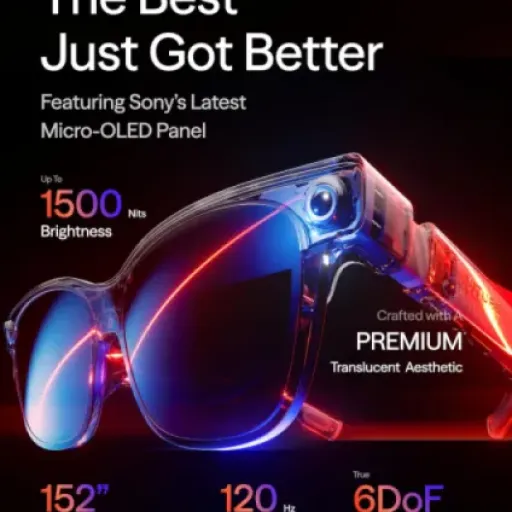
Design‑wise, the XREAL One Pro sits in that middle ground between normal glasses and a tech gadget. They’re not discreet, but they also don’t scream “VR headset” the way a Quest does. The frame is all black, a bit thick around the lenses to house the optics and electronics, with relatively slim arms that hide the Bose speakers. On my head they looked a bit like sporty sunglasses with extra bulk at the front. You won’t forget you’re wearing tech, but you also don’t feel like a complete clown walking through an airport with them on.
The build quality feels decent. No creaks, the hinges have a spring mechanism that gives a bit of flexibility, and the three‑stage adjustable arms actually help get a better angle on your face. The included nose pads come in multiple sizes, and swapping them is simple, though they do feel a bit cheap and rubbery. Still, they stay in place and don’t dig into the nose too badly. The whole thing is plastic, but it doesn’t feel toy‑like. I’d put it on the same level as a decent pair of sports glasses, not luxury eyewear.
The buttons are all on the right arm: four small buttons with different roles (power/menu, brightness, mode, etc.), and you can customize some shortcuts. It takes a couple of days to remember what does what without looking, but once it clicks, being able to tweak brightness or mode without touching your phone is actually very practical. The only annoyance is that the buttons are small enough that with cold fingers or while walking, I sometimes mis‑clicked and had to redo it.
As for the lenses, you’ve got the X‑Prism optics inside and an outer electrochromic layer that tints on demand. The tinting is quick and works well: tap to darken for a movie, tap again to see more of the real world. It’s not instant blackout like VR, but it cuts enough light that you can watch something on a sunny train without the screen washing out. The overall design doesn’t feel premium in a luxury sense, but it feels thought‑through for daily use: reasonably tough, folds like normal glasses, goes into the case easily. Just don’t expect them to survive being sat on or tossed around without the case.
Power and practicality: no battery in the glasses, but your devices pay the price
Important detail: the XREAL One Pro glasses themselves don’t have a built‑in battery. They draw power over USB‑C from whatever you plug them into. That’s good in the sense that you never have to charge the glasses and you avoid another thing to plug in at night. But it also means your phone, Steam Deck, or laptop battery drains faster than usual, sometimes a lot faster depending on brightness and what you’re doing.
On my Steam Deck, I noticed roughly a 20–30% hit compared to playing on the built‑in screen at similar brightness. So if a game usually gives me 2 hours, I’d see more like 1.5 hours with the glasses. On my Android phone streaming Netflix over Wi‑Fi at medium brightness, the drain was noticeable but not disastrous: a 2‑hour movie ate more battery than usual but I still had some left. The big drain happens if you forget to dim your phone screen; since the phone is still mirroring and running at high brightness, you’re powering two displays at once. Turning the phone brightness way down helps a lot.
On a laptop it’s less of a problem, because you usually have a charger nearby, and if you drop the laptop’s own screen brightness, the overall impact is manageable. During a 3‑hour remote desktop session in a hotel, my 14‑inch laptop handled it fine plugged into the wall. For long flights, I’d honestly bring a power bank if you plan to use these with a phone or Steam Deck the whole way. That’s not a flaw specific to XREAL; it’s just how these glasses work in general.
The upside of not having a battery is weight and longevity. No battery means less weight on your face and one less component that will degrade badly after a couple of years. Also, you can toss them in a drawer for months and they’re instantly ready when you plug them in again. So from a practicality point of view, I prefer this approach, but you do need to plan around your main device’s battery if you’re a heavy user on the go.
Comfort and fit: light on the nose, picky with IPD and eyesight
On the comfort side, I’d say they’re generally good but with a couple of catches. Weight first: at around 87 g, they’re much lighter than any headset, and I could wear them for a full movie or a 2–3 hour gaming session without neck pain. The weight is fairly well balanced, so it doesn’t feel like the front is dragging your head down. Compared to something like a Quest 3, it’s night and day. You actually forget about the weight after 10–15 minutes; what you don’t forget is that there’s still plastic resting on your nose and ears.
The nose pads are key here. Out of the box, the default pad was a bit uncomfortable for me after an hour. Swapping to a different size helped a lot and reduced the red marks on my nose. If you wear them tilted slightly downwards, you also get a better image and less pressure. The spring hinges give a bit of flex around the head, so I never had a crushing feeling on the temples. That said, if you try to wear them under big over‑ear headphones, the headphone band can push the arms into your skull and it gets annoying fast. In‑ear buds are a better combo.
Now the tricky part: IPD (interpupillary distance) and vision. This L version is for 66–75 mm IPD. I’m around 69 mm and the built‑in IPD adjustment software helped fine‑tune the clarity. For me, the center of the screen was sharp, and the edges were softer but still readable. But I totally understand the reviews complaining about distortions and double text at the edges. If your IPD is off, or you have astigmatism or other issues, you may end up needing prescription inserts to make these really usable for reading. A couple of users mentioned that once they added prescription lenses, the glasses went from “meh” to “actually great”. That means extra cost and hassle.
Eye strain is another point. For movies and games, I was fine for hours. For coding or long documents, after 30–40 minutes I started to feel my eyes working harder than on a normal monitor. Some of that is the optical distortion on the edges, some is the fact you’re staring at a fixed‑distance virtual screen the whole time. The TÜV blue light and flicker‑free stuff is nice on paper, but it doesn’t cancel basic ergonomics. So: comfort is strong for casual use, acceptable for short work bursts, but I wouldn’t do a full 8‑hour workday in these unless you really have no other screen.
Build strength and long‑term worries
In terms of durability, they feel decent but not bulletproof. The plastic frame and hinges seem solid enough for regular daily use: taking them in and out of the case, wearing them on flights, tossing the case into a bag with other gear. Over a couple of weeks, I didn’t notice any loose parts or weird noises, and the finish didn’t scratch easily. The case they include is firm enough to protect them from most normal accidents like bag pressure or minor bumps, which is where they’ll spend most of their time when you’re not using them.
The parts that worry me a bit more long term are the nose pads and the electrochromic lenses. The nose pads are soft and comfortable, but like any soft rubber, they’ll probably wear, harden, or get grubby after a year or two of heavy use. Hopefully replacements stay easy to find. The tinting layer works well now, but it’s another component that could fail or get uneven over time. No issue yet, just something in the back of my mind when I think about keeping these several years.
The cable is pretty standard USB‑C, nothing fancy. It’s fine, but I’d treat it as a consumable and maybe grab a spare good‑quality cable if you travel a lot. The glasses don’t feel like they’d enjoy being twisted or yanked by the cable, so I tried to be careful about not rolling over it with my chair or hanging the glasses by the cord. Same story as other wired headsets: the cable is usually what dies first, not the device.
On the electronics side, the fact there’s no battery inside is actually reassuring. Batteries swell and degrade; here you’re mostly relying on the displays, the X1 chip, and the sensors. If something fails, you’re probably sending the whole unit back under the 1‑year warranty. I saw a few users mention defective units, but also that XREAL support swapped them fairly quickly, which at least shows the brand is actually handling returns. Overall I’d say durability seems decent as long as you use the case and don’t treat them like throw‑around sunglasses.
Picture, tracking and audio: great for media, mixed for text
This is where the glasses shine the most. For films, TV and games, the picture is genuinely very good for the size and price. The micro‑OLED panels give deep blacks and punchy colours. Out of the box in “Vivid” mode, I actually found the image a bit too aggressive: dark scenes crushed, bright highlights blown out. Switching to “Natural” mode (after a quick firmware update) made a big difference: more balanced contrast, still colourful, less fake‑looking. At 1080p per eye and 57° FOV, you’re not getting insane resolution, but for watching Netflix or playing Elden Ring on a Steam Deck, it looks sharp enough and the 120 Hz support keeps motion smooth.
Where it falls down a bit is text. On a Windows desktop, you can absolutely use it as a monitor, but fine text and UI elements never look as clean as on a real 24‑inch screen. On the center of the image it’s okay, readable and usable. Move your eyes to the edges and you start to notice distortions and slight doubling on high‑contrast text, especially black on white. Some people won’t care if they only watch video; if you plan to write code or handle big spreadsheets for hours, this becomes annoying pretty fast. I could do a couple of hours of remote desktop work in a hotel with no problem, but I wouldn’t throw away my normal monitor for this.
The X1 chip and 3DoF tracking are genuinely solid. Fixed mode (screen anchored in space) feels stable; the screen doesn’t slowly drift off to the side like older AR glasses I tried. Follow mode, where the screen stays in front of you as you move your head, is great for planes or trains where the vehicle is moving in weird ways and fixed mode can feel off. The 2D‑to‑3D conversion and REAL 3D stuff is a fun extra. It’s not cinema‑grade 3D, but it adds a bit of depth without needing special content. Latency felt low enough that I didn’t notice any weird lag when turning my head.
Audio “by Bose” is decent but not mind‑blowing. For quiet environments (home, hotel, airport lounge), the built‑in speakers are good: clear voices, okay bass for open speakers, and people next to you only hear a faint leak unless you blast the volume. On a noisy plane, they’re not strong enough; the engine noise drowns a lot of it and I quickly switched to in‑ear headphones. So the integrated audio is a nice bonus, but I wouldn’t buy these for the sound alone. If you’re picky about audio, just plug in your usual headphones and treat the speakers as backup.
What you actually get and how it works in real life
Out of the box you get the glasses, a semi‑rigid case, a USB‑C cable, a handful of nose pads, and the usual paperwork. No hub, no fancy stand, just the basics. The whole thing is pretty compact; it fits easily in a backpack pocket next to a Steam Deck or a small laptop. The glasses weigh around 87 g, which on paper sounds light, and in practice they do feel lighter than any VR headset I’ve used. It’s closer to sunglasses with a chunky frame than to a helmet.
Setup is basically plug and play. With my Steam Deck and ROG Ally it was instant: plug into USB‑C, the Deck sees it as an external display, and you’re done. Same story with my Windows laptop and my Samsung phone that supports DisplayPort. No drivers, no app required for basic use. The X1 chip and the on‑board interface are the interesting part: you get a built‑in menu you can call up from the buttons on the glasses to change brightness, modes (fixed, follow, etc.), 2D‑to‑3D, and screen size/distance. That’s all handled in the glasses, not on the device, which is handy.
In terms of image, you’re getting 1920×1080 per eye at up to 120 Hz on Sony micro‑OLED panels. Specs say 57° field of view and around a 171‑inch equivalent screen at 4 meters. In practice, it feels like sitting in the middle row of a medium‑sized cinema. Not wall‑to‑wall IMAX, but plenty big enough that a Steam Deck game suddenly feels a lot more serious. The brightness goes up to around 600–700 nits, and with the electrochromic dimming you can darken the lenses when you want a more “cinema” vibe or keep them clearer if you still want to see what’s happening around you.
The experience changes a bit depending on what you plug in. On a phone, it’s just mirroring, so you’ll probably want to dim your phone screen to save battery. On PC and Steam Deck, it’s just another monitor, so you can run games, remote desktop, spreadsheets, whatever. The 3DoF and 6DoF features (if you pair with XREAL Eye, which I didn’t have) are more about how the screen behaves when you move your head. That part works pretty well; the screen doesn’t drift all over the place like some early AR stuff I’ve tried. So as a general “one cable, big screen” product, the presentation is pretty solid.
Pros
- Very good image quality for movies and games with deep blacks and 120 Hz
- Light and comfortable enough for long media sessions compared to any VR headset
- Strong on‑board features (3DoF, follow mode, quick controls) that work with almost any USB‑C video device
Cons
- Lens distortions and edge softness make long text or productivity work tiring
- Total cost climbs quickly if you need prescription lenses or a hub
Conclusion
Editor's rating
After living with the XREAL One Pro for a bit, my feeling is simple: as a portable screen, it’s pretty solid; as a general‑purpose work tool, it’s only okay. The picture for movies and games is genuinely good, especially once you switch to the more natural image mode. The screen feels big, colours pop, and the 120 Hz support makes motion smooth. The on‑board X1 chip and 3DoF tracking make the experience feel stable and polished, without needing extra apps or dongles for basic use. For travel, lying on the sofa, or turning a Steam Deck into a “big TV”, it does exactly what you want.
The weak spots are around text and cost. The optical distortions towards the edges make long reading or coding sessions tiring, and if your IPD or eyesight isn’t ideal, you might need prescription inserts, which adds even more money on top. The built‑in Bose audio is decent but not enough to justify the price alone, and in noisy environments you’ll still end up using your own headphones. So I’d say this is a good product for people who travel a lot, live in small spaces, or really like the idea of a personal cinema everywhere. If you mainly want productivity or you’re very sensitive to visual imperfections, I’d either test them first or look at alternatives.