Summary
Editor's rating
Value for money: useful if you’re already in the Heatmiser world, pricey if not
Design: small, black, and honestly a bit of an eyesore
Durability & reliability: feels basic but stable, with regular updates
Performance: stable connection and simple control, with a few limits
Connectivity & app: mostly smooth, but not the universal hub the box suggests
What this hub actually does in real life
Effectiveness: does it actually help with heating control and energy use?
Pros
- Very reliable day-to-day control of multiple Heatmiser/Neo-compatible thermostats and zones
- Remote access and scheduling via app work smoothly and are easy to understand
- Supports Alexa voice control and keeps existing wired stats instead of replacing everything
Cons
- Design is plain and a bit ugly, you’ll likely want to hide it near the router
- Feels pricey for what is essentially a specialised hub with limited broader smart-home integration
- App and automation features are basic compared to some competing smart thermostat systems

Specifications
View full product page →| Brand | LavaTap |
A small black box that decides if your house is warm or cold
I’ve been using the Heatmiser NeoHub (Gen 3 model, but it’s basically the Gen 2 hardware rebranded) for a few weeks to control a couple of Neo thermostats and a Prowarm unit. In practice, this thing is just the central brain that lets you control your heating from your phone and over the internet. Without the hub, the stats work, but you’re stuck walking to the wall. With the hub, you get app control, remote access, and some basic smart-home tricks.
Setup at home was fairly straightforward: plug the hub into power via USB, connect it to the router with the included cable, run the app, and pair the thermostats. It took me about 15–20 minutes including a firmware update. That’s the honest part: it’s not rocket science, but you do need to read the prompts and not rush. One of my stats paired instantly, the other needed a reset.
From day three, the main change I noticed was simple: I stopped running around the house to tweak temperatures. I could drop the heating from the sofa, or turn it on from the car before getting home. The app is pretty basic visually, but it’s clear enough: zones on the main screen, tap, adjust temperature or schedule, done. No fancy graphs everywhere, but it gets the job done.
So far, my feeling is that the NeoHub is a practical box: not pretty, not packed with crazy bells and whistles, but it does what it says as long as you’re in the Heatmiser ecosystem. If you already have NeoStats or compatible Prowarm gear, it makes sense. If you’re starting from scratch or have a mixed smart home with a lot of Zigbee/Z-Wave stuff, it’s less obvious and feels a bit locked into its own world.
Value for money: useful if you’re already in the Heatmiser world, pricey if not
On value, I’ll be blunt: the NeoHub isn’t cheap for what is basically a small plastic box and some software. The hardware alone doesn’t justify the price; you’re paying for the ecosystem and remote control. If you already own several NeoStats, NeoAir units, or compatible Prowarm thermostats, it starts to make more sense. One hub can manage multiple zones, which spreads the cost and makes the system feel more complete.
Compared to buying a whole new smart thermostat system like Nest or Hive, this can actually be more economical if you already have Heatmiser gear on the walls. You avoid ripping everything out and just add this hub to make your existing thermostats smart and remotely controllable. That’s exactly what one reviewer did with a Prowarm stat: the hub turned a dumb wall controller into something they could manage from their phone. In that scenario, the price feels more justified.
On the downside, if you’re starting from zero, I think there are more flexible options for a similar budget. Some competitors give you nicer apps, better design, deeper integration with other smart-home gear, and more advanced automation. Also, the hub doesn’t really double as a full smart-home hub despite the broad compatibility wording, so you might still end up with multiple boxes (one for lights, one for heating, etc.). That reduces the perceived value if you thought this would centralise everything.
So for me, value is decent but not amazing. It’s good value for money if: you already have compatible thermostats, you want simple and reliable remote control, and you’re fine sticking to the Heatmiser ecosystem. It’s less convincing if: you’re building a new smart home from scratch, or you want one hub to rule every device. In those cases, I’d seriously compare alternatives before dropping the cash on this one.
Design: small, black, and honestly a bit of an eyesore
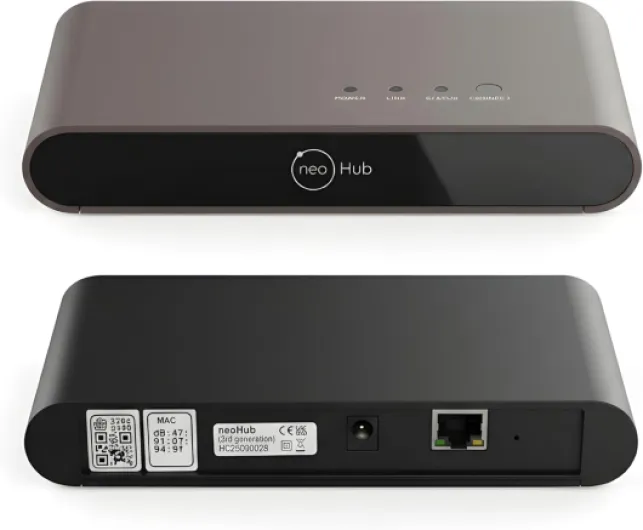
Design-wise, this hub is nothing special. It’s a small rectangular black box, classic plastic, no backlight, no nice display, just some indicator LEDs. One of the Amazon reviewers called it “unsightly”, and I kind of agree. I ended up hiding it behind my router because it doesn’t look like something you want on display in the living room. It’s not huge, but the look is very old-school networking gear, not modern smart-home gadget.
The build feels decent enough: the plastic doesn’t creak, the ports are solid, and the USB power connection sits firmly. I moved it a few times to test Wi‑Fi coverage and it never felt fragile. But there’s nothing premium going on here. No metal, no rubber feet that feel nice, just a practical black box. For a device you touch maybe twice a year, that’s fine, but at this price I wouldn’t mind a cleaner, more discreet design.
On the practical side, the LEDs are useful but a bit bright in a dark room. You get status indicators for power/connection, which helped when I had a short router reboot: you can quickly see if the hub is back online. Still, if you put it in a bedroom or somewhere you sleep, the glow might annoy you. A simple LED dimming option or a physical switch would have been handy.
So my opinion: design is functional and that’s it. It doesn’t feel cheap to the point of being worrying, but it’s not something you’d proudly show off either. If you’re the kind of person who hides the router and cables anyway, you’ll do the same with this. The shape and size are fine, the look is just dated, and for a Gen 3 product it feels like they didn’t bother updating the aesthetic at all.
Durability & reliability: feels basic but stable, with regular updates
For durability, we’re talking more about reliability and software support than physical wear, because this is a small static box that just sits near your router. The hardware itself feels okay: the casing is solid enough, the ports don’t wobble, and the USB power plug doesn’t feel loose. I moved it around a few times, unplugged and replugged it, and it handled that without any fuss. There are no moving parts, so unless it overheats or the power supply fails, it should last a good while.
What matters more is whether the system keeps working over time. During the weeks I used it, I saw one firmware update come through the app. The process was automatic: I tapped update, waited a few minutes, and it rebooted and came back online without me having to re-pair anything. That’s a good sign. The product info also mentions regular updates and future support for new devices, and Heatmiser has been around for a while, so I’m reasonably confident they won’t drop it overnight.
In terms of day-to-day reliability, I didn’t have random disconnections or zones dropping off the network. Once everything was paired, it stayed that way. One thing to keep in mind: if your internet goes down, local control on the thermostats still works, but the app control from outside the house obviously won’t. That’s normal, but worth mentioning. Inside the home, even with a weak Wi‑Fi spot, it kept talking to the stats fine as long as the hub itself had a decent connection to the router.
So my verdict on durability is that it’s steady and a bit boring, in a good way. You don’t need to baby it, and you don’t feel like it’s going to fall apart if you look at it wrong. It’s not premium hardware, but for something that hides behind your router and just needs to be dependable, I’m okay with that. The bigger question is long-term software support, and from what I’ve seen so far plus the brand’s history, I’m reasonably reassured, but of course only time will tell.
Performance: stable connection and simple control, with a few limits
In terms of performance, the NeoHub did what I expected: it kept my thermostats online and responded quickly to commands from the app and Alexa. When I changed a temperature on my phone, I usually saw the stat update within 2–5 seconds, which is perfectly fine for heating. I didn’t have any big dropouts once it was set up, and that’s probably the most important thing: it just stayed connected and did its job quietly in the background.
The pairing process with my NeoStats was mostly smooth. One stat paired first time, another needed a reset and a second attempt, but after that they stayed linked without drama. I also tried it with a Prowarm thermostat that’s basically the same under the hood, and like one of the Amazon reviews said, it worked fine. So if you’re wondering about Prowarm compatibility: yes, it can work, but I’d still double-check your exact model first, because another user clearly couldn’t get it to play nice with their system.
Voice control through Alexa was straightforward. Once linked, I could say simple things like “set living room to 20 degrees” and it would adjust the right zone. It’s not super smart – don’t expect complex scenes or conditions – but the basics are stable. There’s a slight delay, again a few seconds, but nothing dramatic. For me, it made more sense for quick tweaks while cooking or when my hands were busy than as my main control method.
The weak point for performance is more about features than speed. The app is a bit limited if you’re used to more advanced platforms. No deep energy reports, no fancy graphs, not much in terms of geofencing or multi-condition automation. It will help you save energy simply because you can better control schedules and avoid heating an empty house, but it doesn’t push analytics or smart suggestions. So performance is stable and reliable, but not very ambitious in terms of what the system can do compared to some bigger-name smart thermostats.
Connectivity & app: mostly smooth, but not the universal hub the box suggests
Connectivity-wise, the NeoHub is Wi‑Fi based and powered via USB, with a cable to your router. In my setup, once it was connected, I had no major issues with dropouts. I rebooted my router a couple of times to see how it handled it: the hub came back online on its own within a minute or two, and the thermostats reconnected without me doing anything. That’s the kind of boring reliability I actually like in this type of product.
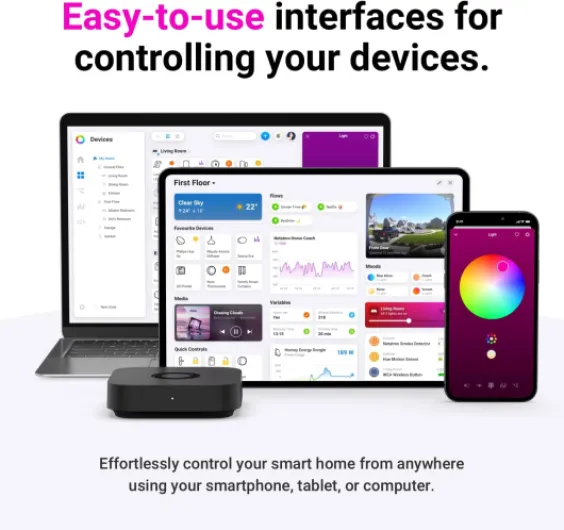
The mobile app is pretty straightforward. The interface is not fancy, but I could:
- See all my zones on the home screen
- Tap into each zone to change temperature and schedule
- Switch between manual and scheduled modes
- Access some basic settings and firmware updates
Navigation is logical enough that I didn’t need a manual after the first day. That said, it feels like an older generation app: no dark mode, not much personalisation, and the layout could be cleaner. But it didn’t crash on me, and login/remote access from mobile data worked every time I tried, which matters more than visual polish in my opinion.
Now, about the claimed "universal" compatibility (Wi‑Fi, Zigbee, Z‑Wave, etc.): in practice, I didn’t manage to use it as a central hub for random third-party devices. It’s clearly focused on the Heatmiser / Neo ecosystem and a small set of supported gear. If you already run a mixed smart home with Philips Hue, random Zigbee sensors, and Z‑Wave plugs, don’t expect the NeoHub to magically replace your other hubs. For me, it behaved as a specialised heating hub with some smart features, not a general smart home brain. That’s fine, but the branding can give a different impression.
What this hub actually does in real life
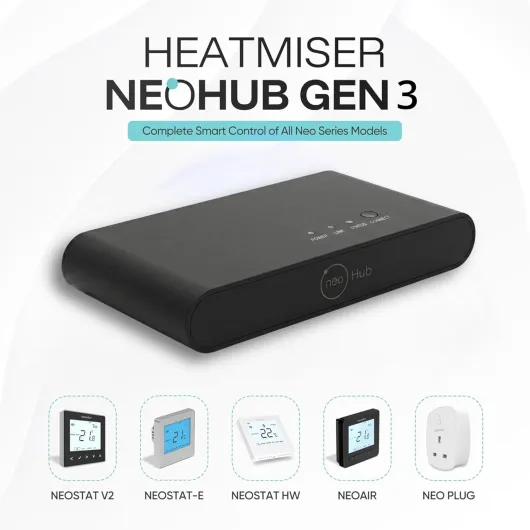
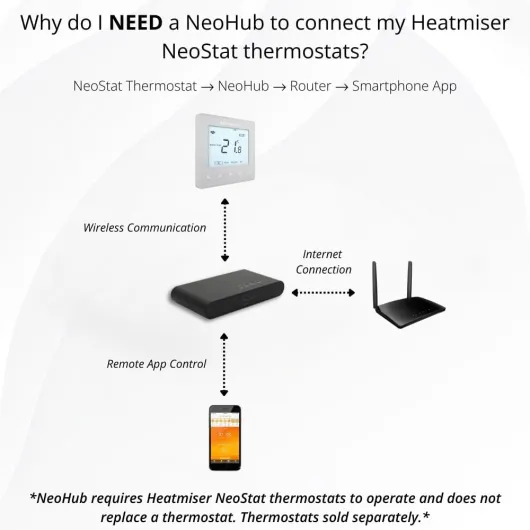
On paper, the Heatmiser NeoHub Gen 3 sounds like a universal smart home hub that talks to Wi‑Fi, Zigbee, and Z‑Wave. In reality, at home it behaved mainly as a dedicated controller for Heatmiser/Neo-compatible thermostats and a few related devices (NeoStat, NeoAir, NeoPlug). I didn’t manage to use it as a general hub like a SmartThings or a proper Zigbee bridge. So if you’re picturing one box to run every smart gadget in your house, that’s not what I experienced.
The core function is simple: it links your heating devices to the internet and to the Neo Smart Home app. Through that you can:
- See current room temperatures and setpoints
- Change schedules for each zone (weekday/weekend etc.)
- Turn heating or hot water on/off remotely
- Use voice control via Alexa (I tested Alexa only)
The automation side is there but a bit limited. You can set up routines and schedules, but don’t expect crazy conditional logic like “if outside temp is below X and I’m 2 km from home then do Y”. It’s more basic: time-based schedules, manual overrides, and some grouping by zones. For most people, that’s probably enough, but if you’re into heavy automation, you’ll feel the limits quite fast.
Overall, in day-to-day use, the hub’s role is clear: it keeps all your Heatmiser thermostats in sync and reachable from anywhere. It doesn’t pretend to be a full smart-home platform in my house, despite what the general compatibility wording suggests. For me, it’s a focused heating gateway, not a full-blown home automation center, and that’s an important thing to understand before you buy.
Effectiveness: does it actually help with heating control and energy use?
On the effectiveness side, I judge this hub by one simple question: did it help me run my heating more sensibly and with less hassle? Overall, yes. After a couple of weeks, I’d say it made it easier to stick to realistic schedules and avoid leaving the heating higher than needed. Being able to quickly lower the temperature from bed or when leaving the house meant I actually did it, instead of thinking “I’ll do it later” and forgetting.
The multi-zone support is genuinely useful if you have several stats or areas. In my case, I had a main living area, bedrooms, and a small office. Before, I would just set rough schedules and leave them. With the hub and app, I started to fine-tune things: cooler bedrooms at night, slightly warmer office during working hours, and lower heating in the living room during the day. Once I set this up properly, I basically stopped touching it, only doing occasional manual tweaks when the weather changed suddenly.
As for energy savings, I can’t give an exact number, but I noticed the boiler cycling less often in the evening because I wasn’t overheating the whole house just to keep one room comfortable. The app makes it clear which zones are calling for heat, so you quickly see if you’ve left something too high. It’s not magic, but it gives you enough control to stop wasting heat without turning into a heating engineer.
Where it could be better is guidance. The hub doesn’t really help you decide good setpoints or highlight wasteful patterns. It doesn’t send smart alerts like “hey, your heating has been on for 8 hours straight, sure about that?” It’s more a remote control with scheduling than a clever assistant. So yes, it’s effective if you’re willing to spend a bit of time setting things up and thinking about your schedule. If you want the system to do the thinking for you, this will feel a bit basic.
Pros
- Very reliable day-to-day control of multiple Heatmiser/Neo-compatible thermostats and zones
- Remote access and scheduling via app work smoothly and are easy to understand
- Supports Alexa voice control and keeps existing wired stats instead of replacing everything
Cons
- Design is plain and a bit ugly, you’ll likely want to hide it near the router
- Feels pricey for what is essentially a specialised hub with limited broader smart-home integration
- App and automation features are basic compared to some competing smart thermostat systems
Conclusion
Editor's rating
After using the Heatmiser NeoHub Gen 3 for a while, my overall feeling is that it’s a solid but very focused product. It does one main job: it puts your Heatmiser/Neo-compatible thermostats on the internet and in a mobile app, with enough stability and speed to be genuinely useful. Remote control works, multi-zone control works, and voice commands via Alexa are handled without drama. It’s not pretty and the app isn’t fancy, but day-to-day it gets the job done and mostly stays out of your way.
Who is it for? It’s a good fit if you already have NeoStats, NeoAir, or compatible Prowarm thermostats and you’re tired of walking to the wall to change settings. If your house has several zones, the hub really starts to pay off because you centralise everything in one place and can fine-tune schedules room by room. You’ll probably squeeze some energy savings out of it just by avoiding unnecessary heating, even if the system itself isn’t packed with smart advice or analytics.
Who should skip it? If you’re starting from scratch, or if you want a true all-in-one smart-home hub for lights, sensors, plugs, and more, this is not the best choice. The design is basic, the app is a bit old-school, and the claimed broad compatibility is more limited in practice. In that case, I’d look at broader platforms first. But if you’re already in the Heatmiser world and just want reliable remote control and scheduling, this hub is a pretty solid, if slightly overpriced, way to round out your system.