Summary
Editor's rating
Value: worth it if you know why you want smart glasses
Design: looks more gadget than regular glasses, but not too crazy
Battery life: the claimed 12 hours is realistic only for light use
Comfort: light enough for a day, but you’ll still feel them
Durability and build: decent, but I’d still baby them a bit
Performance: AI, translation and camera – what actually works
What these glasses actually do day to day
Pros
- Comfortable and light enough (49 g) for several hours of use with decent build quality
- Useful 4K POV camera with simple temple shortcuts for hands-free content capture
- Practical AI features (ChatGPT & Gemini), translation, and navigation that actually help in real situations
Cons
- Battery life drops quickly with heavy camera and AI use, 12 hours only realistic with light usage
- Software and controls still a bit glitchy at times, not as smooth as using a smartphone
- Design is clearly techy and noticeable, not as discreet as regular glasses

Specifications
View full product page →| Brand | Rokid |
AI on your face: fun gadget or real tool?
I’ve been using the Rokid Glasses for a bit now, mostly for commuting, a couple of work meetings, and some weekend walking around town. I wasn’t expecting a sci‑fi experience, but I did want something more useful than the usual “toy” AR glasses. On paper, these tick a lot of boxes: display, AI with ChatGPT and Gemini, translation, navigation, meeting notes, camera… basically, a smartphone strapped to your face with a HUD.
Right away: this is not magic, but it’s also not useless. It sits somewhere in between. In situations where you need your hands free – taking quick POV videos, checking directions while carrying bags, or getting a translation in a noisy street – it actually helps. In other cases, I just went back to my phone because it was faster and less fiddly.
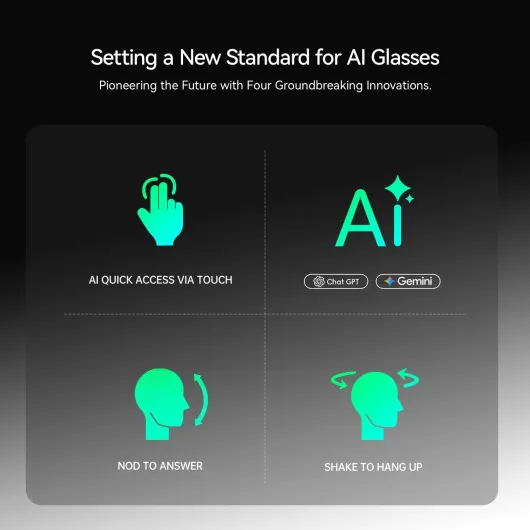
The brand pushes the “world’s first multi‑LLM glasses” thing pretty hard. In reality, what matters is: does the AI answer fast and is it readable on the display? Most of the time yes, sometimes it lags or loses context. The good point is that you can trigger and talk to it without pulling your phone out, which is the whole idea of wearing this type of product.
If you’re expecting a polished, invisible assistant that anticipates everything, you’ll be disappointed. If you’re curious about smart glasses and willing to accept some quirks, there’s enough here to play with and actually use day to day. I’ll go through what worked for me and what clearly still feels like “early adopter” territory.
Value: worth it if you know why you want smart glasses
On the value side, you have to be honest with yourself: are you buying these as a toy to try AI on your face, or as a tool for specific tasks like POV content, translations, and quick notes? If it’s just curiosity and you rarely use the features after the first week, it will feel like an expensive gadget. If you actually record a lot of video, travel often, or attend many meetings, you can get real use out of them.
Compared to other smart glasses and AR headsets, Rokid sits somewhere in the middle. You’re not paying the crazy prices of full AR headsets, but it’s still more expensive than basic audio-only smart glasses. The fact that you get a display, AI integration with ChatGPT and Gemini, 4K camera, and translation in one device does help justify the cost. You don’t need separate translation earbuds, action cameras, and a HUD device – this tries to do all of that at once.
That said, it’s not perfect. The software still has small glitches, the battery drops faster under heavy use, and the design is clearly techy. So you’re paying partly for being an early adopter in this category. If you want something totally mature and polished with no quirks, this is probably not it. But if you like testing new tech and you’re okay with a few rough edges, the value is decent because the core functions – POV video, basic AI help, and translation – actually get used.
For me personally, the thing that made it feel more justified was the hands-free content capture. Filming cooking, DIY, or walks without juggling a phone is genuinely practical. The AI and translation are bonuses that I used less often but still appreciated. So I’d say: good value if you have clear use cases, average value if you just want to see what the hype is about and then leave them in a drawer.

Design: looks more gadget than regular glasses, but not too crazy
Design-wise, the Rokid Glasses sit in that middle ground: they don’t look like normal prescription frames, but they’re also not huge sci‑fi goggles. The frame is rectangular with a bit of bulk around the temples where the electronics live. The 49 g weight is visible more in the thickness than the actual comfort. From the front, they’re fairly discreet; from the side, you can clearly see it’s a tech product.
The titanium hinges are a nice touch. They feel sturdier than generic plastic hinges you see on cheap smart glasses. I opened and closed them a lot, tossed them into a backpack without a case a few times, and there’s no wobble yet. The finish doesn’t scream luxury, but it doesn’t feel like a toy either. It’s somewhere between mid‑range sunglasses and a consumer electronics gadget.
The shortcuts on the temple are smart in theory. You have a short press for photos, long press for videos, and you can tweak some of it. In real life, I had a couple of missed presses at the start, especially with gloves or when I was moving. Once you get the hang of where to press, it becomes more natural, but don’t expect perfect reliability on day one. Still, it’s faster than digging out your phone when something happens in front of you.
One thing to keep in mind: people will notice them. They’re not as bulky as some AR headsets, but when you’re in a meeting or a café, folks will glance at the frame and the little camera. If you’re shy about wearing visible tech on your face, that might bother you. If you’re used to headphones and smartwatches, this is just one more gadget, but it’s not as low‑profile as regular glasses yet.
Battery life: the claimed 12 hours is realistic only for light use
The official line is up to 12 hours of battery life under normal use. As always, “normal” is vague. In my tests, I got something like a full workday if I used them mostly as passive glasses with occasional AI queries and a few short videos. If I started recording more often and playing with translation and navigation, the battery dropped faster and I was looking at more like 6–8 hours.
For example, one Saturday I used them heavily: several 5–10 minute video clips, translation while walking around town, and some navigation. By late afternoon, the battery was clearly not happy and I had to charge them. On a calmer office day with 2–3 short clips and a handful of AI questions, they did last roughly the full day without dying. So yes, the 12 hours is doable, but only if you keep the heavy features in check.
The magnetic fast charging is a nice detail. You don’t have to fiddle with a tiny port; you just snap the cable on. It’s similar to some smartwatch chargers. From low battery to a decent level took under an hour in my experience, which is good if you charge them during lunch or between meetings. I wouldn’t call it super fast, but it’s quick enough that you don’t feel stuck.
One thing to note: because the glasses are so light, there’s obviously a limit to how big the battery can be. If you’re planning to film a whole day of vlogging just with these, you’ll hit the limit. For mixed use – some filming, some AI, some translation – it’s okay. If you treat them like a smartphone and hammer every feature all the time, you’ll need to keep the charger close. It’s basically acceptable battery life with realistic compromises for the form factor.
Comfort: light enough for a day, but you’ll still feel them
The brand insists on the 49 g weight, and to be fair, that’s pretty light for smart glasses with a display and camera. On the nose, they sit better than I expected. I’ve had sunglasses that felt heavier and left marks faster. After about 2–3 hours of continuous wear, I started to feel some pressure on the nose and a bit on the ears, but it wasn’t painful – just the usual “I’ve been wearing glasses for a while” feeling.
I wore them for a full workday once, alternating between actually using the features and just letting them sit there. Around hour six or seven, I did take them off for a break. So yes, they are wearable all day, but realistically you’ll probably take them off now and then, especially if you’re not used to glasses. If you already wear prescription glasses daily, the jump is smaller. If you usually don’t wear anything on your face, it’ll take some getting used to.
The nose pads and overall contact points are okay but nothing fancy. They don’t dig in, but they also don’t disappear. When walking outside, they stayed in place pretty well, even when I was looking down at the ground or up at signs. During a short jog to catch a bus, they did bounce slightly, but not to the point of falling off. I wouldn’t use them for running or intense sports, though; they’re clearly more for walking, commuting, and office / travel use.
Audio comfort is decent too. The immersive private audio is basically small speakers near your ears. People next to me in a quiet room could faintly hear something if I cranked the volume, but at normal levels it stayed reasonably private. For calls and AI replies, it’s fine. For music, it’s okay for background listening, but don’t expect the punch of proper earbuds. Overall, for what they are, the comfort is pretty solid, but not at the level where you forget you’re wearing tech.
Durability and build: decent, but I’d still baby them a bit
In terms of durability, the Rokid Glasses feel more solid than cheap plastic gadgets, but not like something you’d happily throw around. The titanium hinges are the main reassuring part: after repeated opening and closing, they still feel tight with no creaks. The rest of the frame is plastic, and while it doesn’t feel flimsy, it’s also not indestructible. I wouldn’t sit on them or toss them at the bottom of a bag with keys and metal objects.
I did carry them in a backpack without a case a few times, just between a laptop sleeve and a notebook. No cracks, no major scratches, so that’s encouraging. Still, you can tell that a direct drop onto concrete would probably leave a mark, especially around the camera and lens area. These are electronics on your face, not rugged safety glasses. There’s also no mention of serious water resistance, so I avoided wearing them in heavy rain. Light drizzle seemed fine, but I wouldn’t push my luck.
The digital display and camera lens held up okay in my short test period. No visible dead pixels or fogging, and the image quality stayed consistent. Wiping them with a microfiber cloth is enough to keep them clean. Just don’t use rough fabrics or cleaning chemicals; treat them like a phone screen or camera lens. They also come with a standard charging cable and manual – nothing fancy in terms of protection, so if you plan to travel with them a lot, I’d invest in a proper case.
Overall, I’d call the durability pretty solid for careful daily use, but not something I’d trust in harsher environments. Office, commuting, travel, and home use: fine. Construction site, extreme sports, or rough backpacks: I’d be more cautious. For the price range and category, that’s about what I expected, but don’t buy them thinking they’re bulletproof.
Performance: AI, translation and camera – what actually works
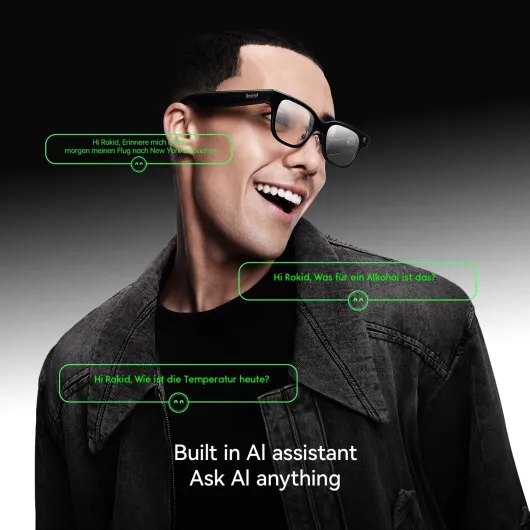
From a performance standpoint, the glasses are a mixed but mostly positive bag. Let’s start with the AI (ChatGPT & Gemini). When the connection is stable, responses are fairly quick – usually a couple of seconds for short questions, a bit longer for summaries. I used it during a meeting to generate a quick recap of what was said. It caught the main points but missed some details, which is kind of standard for AI summaries right now. Still, having the notes pop up in your field of view is handy.
The real-time translation is where things get interesting. I tested it with English–French and English–German. For short sentences and menus, it did a good job. I pointed my head towards a sign, triggered the assistant, and could read the translation without grabbing my phone. In a noisy café, though, it sometimes misheard or mixed words. So it’s good as a helper, but I wouldn’t rely on it 100% for anything critical like legal documents or medical stuff.
The 4K camera does what it says. The footage is sharp enough and the POV angle is great when you need both hands – cooking, DIY, or small repairs. I noticed that in low light, noise creeps in, but that’s normal for tiny sensors. The 10‑minute limit per clip is a bit annoying if you want to record something longer, but for social content it’s fine. The main advantage is not having to think about framing; you just look at what you want to show.
As for overall system stability, I had a couple of small hiccups: once the AI froze and I had to reconnect, another time the camera shortcut didn’t trigger on the first press. It’s not a crash‑fest, but it’s also not as smooth as using just a smartphone. You can feel that this category is still maturing. If you accept that, the performance is good enough to be genuinely useful in some scenarios, especially for content capture and quick information checks.
What these glasses actually do day to day
On the spec sheet, the Rokid Glasses try to do a bit of everything: 4K camera, integrated display in the lens area, AI assistant with ChatGPT and Gemini, real-time translation, navigation, and meeting notes. In practice, the things I actually used the most were: taking quick POV clips, checking short bits of text on the display (directions, short AI answers), and translation when dealing with menus or signs.
The camera records up to 10‑minute clips in 3:4, 4:3, or 9:16. That’s clearly aimed at people who post on TikTok, Reels, or YouTube Shorts. I used it to record a bike ride and some cooking steps. It’s not cinema quality, but it’s good enough for social media and “here’s what I’m seeing” videos. The big plus is having your hands free; you don’t have to clamp a phone somewhere or wear a chest mount.
The AI side with ChatGPT and Gemini is basically an audio + text interface: you talk, it answers, and the reply shows up on the display. It’s handy for quick questions like “what’s a polite way to say X in English/German?” or “summarize these meeting points.” But you still hit the usual AI limits: sometimes vague answers, sometimes wrong, and you have to speak clearly. It’s nice that you’re not locked into one model, though, and you can pick what works better for you.
Real-time translation and navigation are the two features that feel the most “natural” on glasses. Translation works decently in relatively quiet places. In a busy street, background noise can throw it off, but reading the translated text on the lens is more practical than staring at your phone while walking. Navigation is similar: glancing at arrows or directions in front of your eye is handy, though you still need to pay attention to traffic because the display can be a distraction if you’re not used to it.
Pros
- Comfortable and light enough (49 g) for several hours of use with decent build quality
- Useful 4K POV camera with simple temple shortcuts for hands-free content capture
- Practical AI features (ChatGPT & Gemini), translation, and navigation that actually help in real situations
Cons
- Battery life drops quickly with heavy camera and AI use, 12 hours only realistic with light usage
- Software and controls still a bit glitchy at times, not as smooth as using a smartphone
- Design is clearly techy and noticeable, not as discreet as regular glasses
Conclusion
Editor's rating
The Rokid Glasses are one of the first smart glasses I’ve tried that feel usable beyond the initial “wow” phase. They’re light enough to wear for several hours, the 4K POV camera is genuinely handy, and the AI with ChatGPT and Gemini is practical for quick questions and simple summaries. Real-time translation and navigation make sense on glasses and work well enough for travel and city walking, as long as you accept the odd error and a bit of lag.
They’re not flawless. The design still looks clearly like a gadget, the battery only reaches the claimed 12 hours if you use them lightly, and the software occasionally stutters. This is still early adopter territory: if you expect a perfect, invisible assistant, you’ll be let down. But if you’re into tech, create content, travel a lot, or just like having your hands free while getting directions or translations, there’s real value here, not just a gimmick.
I’d recommend them to people who already like trying new devices and can live with a few quirks: vloggers who want POV shots, frequent travelers who deal with foreign languages, or professionals who sit in a lot of meetings and want quick notes. If you’re on a tight budget, hate visible tech on your face, or just need something rock-solid and dead simple, you’re probably better off with a good phone plus earbuds and a normal camera. Overall, pretty solid smart glasses with real use cases, as long as you know what you’re getting into.