Summary
Editor's rating
Value for money: not cheap, but can replace a lot of other stuff
Design: small, discreet, and easy to hide
Packaging and unboxing: check your box, seriously
Durability and reliability: hardware is fine, support window is a question mark
Performance and connectivity: mostly solid, but not magic
What the Homey Pro mini actually is (and what it isn’t)
Effectiveness: does it actually simplify the smart home mess?
Pros
- Clean, polished app and automation system (Homey Flow) that’s easier to use than DIY solutions
- Strong support for Zigbee, Matter and Thread with local processing and Ethernet for stable performance
- No mandatory subscription for core features like remote access and voice assistant integrations
Cons
- Z-Wave, Bluetooth and Infrared require the separate Homey Bridge, increasing total cost
- Software update guarantee is unclear and some devices/brands rely on less reliable community apps
- Some reports of refurbished units being shipped as new, so the buying experience can be hit and miss

Specifications
View full product page →| Brand | Homey |
A tiny box that wants to run your whole house
I’ve been playing with the Homey Pro mini for a few weeks, basically trying to see if this little black puck could replace my mix of hubs and half-baked automations. I’ve used Home Assistant, a Hue bridge, and the usual Alexa/Google stuff before, so I wasn’t starting from zero. What grabbed me first was the promise: Zigbee, Matter, Thread, Ethernet, no subscription, and one app to control everything. On paper, it ticks pretty much all the boxes if you’re into smart home gear but don’t want to spend every weekend fixing things.
In practice, it sits somewhere between “power user toy” and “normal person friendly”. It’s easier to live with than Home Assistant, but it’s not as plug-and-play simple as just using Alexa or Google Home alone. You still need to be ready to spend some time setting things up, reading which integrations work, and building your automations in Homey Flow. If you’re expecting magic out of the box, you’ll be a bit disappointed.
What I noticed quickly is that the whole system feels more polished than the DIY approach, but you can also bump into random limitations depending on your devices. The reviews on Amazon (3.6/5) reflect that pretty well: some people love it, others hit issues with connections or expectations. I had a bit of both. When it works, it’s smooth and feels stable; when something doesn’t pair right, it’s mildly annoying because you know the hub itself should be capable.
So this review is basically: what it does well, where it gets on my nerves, and whether it’s worth the money if you already have stuff like Hue, Alexa, or a DIY Home Assistant setup. I’m not going to dress it up: it’s a solid bit of kit with some rough edges and some gaps you need to be aware of before you buy.
Value for money: not cheap, but can replace a lot of other stuff
Price-wise, the Homey Pro mini isn’t a budget toy. It sits in that slightly painful zone where you start thinking, “Do I really need this, or can I just stick with what I have?” But once you factor in what it replaces, it starts to look more reasonable. For example, if you’re currently paying for something like Nabu Casa with Home Assistant, plus juggling separate hubs (Hue bridge, maybe a Zigbee dongle, random vendor apps), Homey can centralize a lot of that with no mandatory subscription for the core features. You pay once, and you’re done, unless you want cloud backups.
Compared to the full-size Homey Pro, this mini version is clearly meant for people who don’t need every single radio and insane capacity. If your setup is medium-sized and mostly Zigbee/Matter/Thread, this is enough. If you’re deep into Z-Wave or have loads of devices, you might regret not going for the bigger model or adding the Homey Bridge, which of course adds to the total cost. So the value really depends on your existing gear and how far you plan to grow your system.
From my experience, the value feels decent if you actually use it as the main brain and lean into Homey Flow, energy monitoring and the integrations. If you just plug it in, pair a couple of bulbs and then keep using Alexa routines for everything, it’s overkill. Where it shines is for people who are annoyed by having 5 different apps and want one place to automate their house without going full nerd with Home Assistant.
So I’d sum it up like this: good value for someone who’s already invested in smart home stuff and wants something more polished than DIY, but still flexible. Less good value if you’re just starting out with two bulbs and a smart plug – in that case, I’d start cheaper and see if you actually care about complex automations before dropping this kind of money on a hub.
Design: small, discreet, and easy to hide
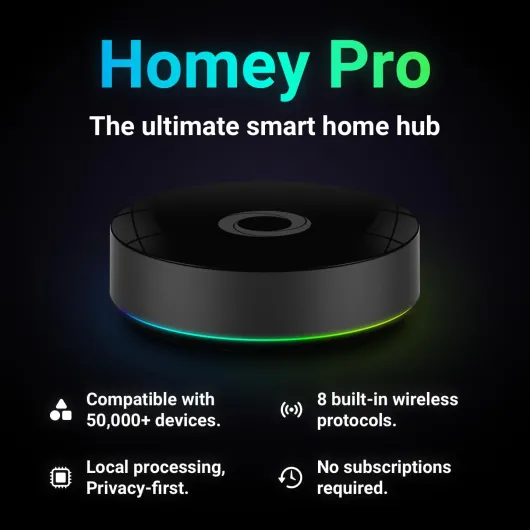
Physically, the Homey Pro mini is pretty straightforward: a small black square-ish puck, about 9.7 x 9.7 x 2.9 cm and around 540 g. It’s heavier than it looks, which I actually like, because it stays put on a shelf and doesn’t get dragged around by cables. There’s nothing flashy going on: no big glowing ring like the older Homey, no silly light show. It just looks like a small network device, which is fine for a hub you’ll probably forget about after setup.
Ports are simple too: power and Ethernet. You can run it on Wi‑Fi, but given it’s the brain of the house, I plugged it straight into my router with the included Ethernet cable. That’s one thing I appreciated: they actually include the cable and a proper power adapter, not just a random USB-C and “good luck”. For a device at this price, that should be standard, but we all know it often isn’t.
In terms of placement, it doesn’t need much space and doesn’t look out of place next to a router, NAS or TV box. No fan noise, no heat issue in my case; it gets slightly warm but nothing worrying. The plastic doesn’t feel cheap, but it’s not premium either – just normal, decent plastic. If you’re into fancy design, this isn’t going to excite you, but at least it doesn’t scream “gadget” from across the room.
The only slight downside for me is that there’s no clear visual status from a distance. You can’t really tell at a glance if it’s busy, rebooting or stuck, like you could with some hubs that have more obvious LEDs. It’s not a big deal day-to-day, but when you’re troubleshooting, a more readable indicator would help. Still, overall, design-wise, it gets the job done: compact, quiet, and easy to tuck away.
Packaging and unboxing: check your box, seriously
The packaging is pretty standard for a smart hub: a compact box with the Homey Pro mini, power adapter, USB cable, Ethernet cable and a basic user manual. Nothing fancy, but you get what you need to get started. I like that the Ethernet cable is included, because a lot of brands cheap out on that and then people end up using Wi‑Fi for a device that really should be wired. The user manual is short but enough to get you through the first setup; after that, you mostly live in the app anyway.
Now, here’s where I’d be a bit careful. One of the Amazon reviewers mentioned receiving a unit that was clearly refurbished but sold as new: three sets of security stickers on the box, scuffed packaging, missing USB cable. And apparently that wasn’t a one-off, since they said it seems to be a common issue and the device was already on its third return. That’s not great. It doesn’t say anything bad about the product itself, but it does mean you should take two minutes to inspect the box when it arrives.
When I got mine, the box was clean, seals looked untouched, and everything listed was inside. If you see multiple layers of stickers or damaged seals, I’d personally send it back straight away. For a hub at this price, you shouldn’t be dealing with missing cables or mystery returns. It’s not the end of the world, but it’s annoying and wastes time, especially when you’re in the mood to set everything up that same evening.
So, packaging verdict: functional but nothing special, and the main tip is simply to check you actually got a new unit with all the parts. If you do, the unboxing is straightforward and you’ll be up and running quickly. If not, expect a bit of hassle with returns. That’s more an Amazon logistics thing, but it’s part of the experience, so it’s worth mentioning.

Durability and reliability: hardware is fine, support window is a question mark
In terms of physical durability, there’s not a lot that can go wrong here. It’s a small plastic box with no moving parts and no battery. During my time with it, it ran 24/7 without any obvious issues: no random reboots, no overheating, nothing like that. It feels solid enough in the hand, and the weight gives a bit of confidence that it’s not totally hollow junk. If you don’t drop it or drown it, it should last years from a hardware point of view.
Where I’m a bit less confident is the software support timeline. On the listing, the “guaranteed software updates until” field is blank/unknown. That doesn’t mean they’ll drop it tomorrow – Homey has a decent track record of updating their products – but it also doesn’t give a clear promise. For something that’s meant to sit at the center of your home, I’d like a more explicit guarantee, like “updates until 20XX”. If you care about long-term support, that missing detail is worth keeping in mind.
Reliability of the system overall was decent. Flows kept working, and I didn’t lose my configuration. There’s backup options: you can back up locally or to the cloud. Just note that cloud backup needs a subscription, which isn’t super clear if you just skim the product page. If you’re the type who likes to tinker and wipe systems, that backup option is pretty important. Restoring from a backup is straightforward, so you’re not rebuilding from scratch every time something goes wrong.
One thing that bothered me when reading other user reviews: some people received refurbished units sold as new, with multiple security stickers, damaged boxes and missing cables. That’s more on the seller or Amazon logistics than on Homey, but from a buyer’s point of view, it still affects trust. If you order one, I’d definitely check the box carefully: seals, contents, and general condition. The device itself seems robust, but the whole buying experience can be hit and miss if you get a returned unit instead of a fresh one.
Performance and connectivity: mostly solid, but not magic
On the performance side, I’d say the Homey Pro mini is pretty solid once everything is paired. Response times for Zigbee lights and switches were basically instant for me, especially when using Ethernet. Flows that turned on multiple devices at once fired reliably, and I didn’t see big delays like you sometimes get with cloud-only hubs. Voice commands through Alexa and Google also worked fine, with Homey sitting in the background as the brains. The local processing makes a difference: when my internet went down for an hour, my basic automations kept running without any drama.
That said, not everyone has had the same luck. One of the Amazon reviews mentions bad connection problems with smart home devices. I didn’t see anything that extreme, but I did notice that range is not endless. It’s a small hub with internal antennas, so if you put it in a cabinet behind a metal router, don’t expect miracles. I got better stability when I placed it a bit more central and not buried behind other gear. For Zigbee, having a few powered devices (bulbs, plugs) to act as repeaters also helps a lot. If you just have a couple of battery sensors far away, you might see dropouts, but that’s true for most Zigbee setups.
Where it feels “mini” compared to the bigger Homey Pro is when you start stacking lots of apps and devices. I didn’t hit a hard limit, but you can tell this is meant for small to medium setups, not a whole mansion with every corner automated. The good side is that the software itself feels polished: the app is quick, flows aren’t laggy to edit, and the insights/energy tabs load without feeling clunky. It’s a big step up from the constant tweaking I had to do with Home Assistant on a Raspberry Pi.
However, it’s not perfect. Some community apps are less stable than others, and you can run into random glitches where one brand doesn’t expose all its features through Homey. It’s not really the hub’s fault alone, but as a user you don’t care whose fault it is – you just see that something you expect is missing. So performance is good overall, but depends a lot on your mix of devices and how you place the hub. If you’re expecting it to magically fix a messy network or badly placed devices, you’ll be disappointed.
What the Homey Pro mini actually is (and what it isn’t)
The Homey Pro mini is a small smart home hub that’s supposed to sit in the middle of all your devices and make them talk to each other. It supports Zigbee, Matter, Thread and Ethernet out of the box. That means you can connect a lot of bulbs, sensors and plugs directly, and also use it as a Matter controller and Thread border router. If you want Z-Wave, Bluetooth or Infrared, you need the separate Homey Bridge, which is a bit annoying if you already have Z-Wave kit lying around. So out of the box it’s strong on modern standards, weaker if you have older or more niche stuff.
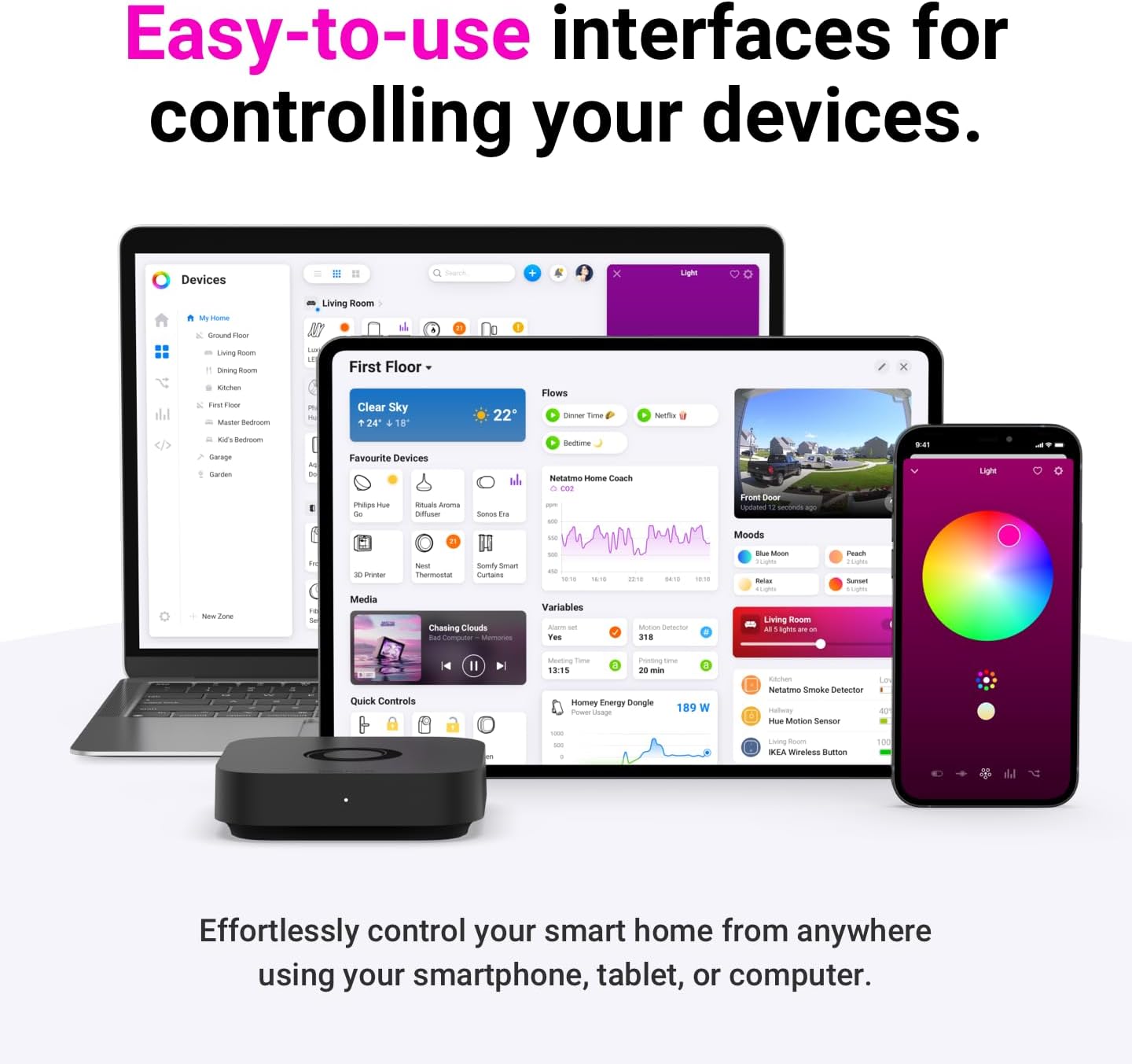
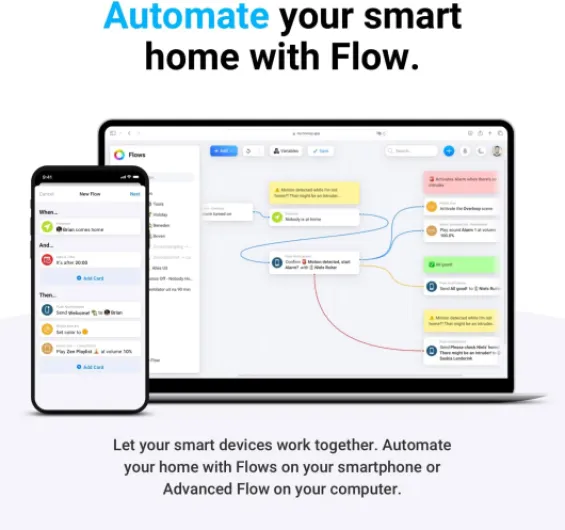
The big selling point is that everything is handled in the Homey app and their “Flow” automation system. You can build simple routines like “when I arrive home, turn on lights and start music” or more complex ones with conditions and time ranges. It also works with Alexa, Google Assistant and Siri, so you can still yell at your speakers to turn things on and off. The nice bit is that most automations run locally, so if your internet drops, your lights and basic flows still work, which is a big step up from cloud-only systems.
Compared to something like Home Assistant, the idea here is: less tinkering, more ready-to-use. You install official or community “apps” inside Homey for brands like Sonos, Philips Hue, Ecobee, TP-Link, Govee, etc. Once installed, those devices show up in Homey and you can use them in flows. In reality, it’s not 100% complete; some brands and features are covered better than others, and you can feel the difference between official and community apps. But overall, I managed to pull in most of my stuff without crazy workarounds.
Important detail: the product page and some reviews talk about no subscription needed, but cloud backup does require a paid plan. The base features (remote access, voice integrations) work without a monthly fee, which is good. Still, it’s worth knowing that if you want automatic cloud backups rather than manual/local backup, there’s a cost. So the “no subscription” line is mostly true for everyday use, but not totally free if you want every single feature.
Effectiveness: does it actually simplify the smart home mess?
The real question for me was: does the Homey Pro mini actually make life easier, or is it just another box to manage? After a couple of weeks, I’d say it does help, but only if you commit to moving most of your logic into Homey. Once I recreated my main automations in Homey Flow – things like lights based on motion and time, heating tweaks, music scenes when I get home – I started using the other apps (Hue, Alexa, etc.) mostly as dumb endpoints. That’s when it started to feel like an actual hub, not just an adapter.
Homey Flow itself is one of the better automation builders I’ve used. The interface is clear, and you can do both simple stuff and more advanced branches without needing to code. Compared to Home Assistant’s YAML or Node-RED, this is much easier for normal people. You can build things like: “if it’s dark, and someone comes home, and it’s a weekday, then turn on these lights and set the thermostat, but only if no one is already in the living room”. It takes a bit of time to learn the logic, but once you get it, it’s pretty powerful for a non-coding system.
On the energy and insights side, it’s handy but not life-changing. You can track energy usage of compatible plugs and devices, see history, and build flows based on consumption. If you’re into that, it’s nice, but it depends a lot on having the right devices that report properly. I wouldn’t buy the hub just for that feature, but as a bonus, it’s fine. The dashboards and graphs are clear enough, and it’s useful to spot which devices are always drawing power.
Where it falls short a bit is when a device or brand you own isn’t well supported. Then the “one hub to rule them all” idea breaks down quickly. You end up with a couple of devices still managed outside of Homey, and that’s when it starts to feel messy again. So in terms of effectiveness: if most of your devices are on the supported list (Zigbee/Matter/Thread and popular brands), it really can centralize things. If you have lots of niche or older gear, it’s more hit and miss, and you might not get the full benefit.
Pros
- Clean, polished app and automation system (Homey Flow) that’s easier to use than DIY solutions
- Strong support for Zigbee, Matter and Thread with local processing and Ethernet for stable performance
- No mandatory subscription for core features like remote access and voice assistant integrations
Cons
- Z-Wave, Bluetooth and Infrared require the separate Homey Bridge, increasing total cost
- Software update guarantee is unclear and some devices/brands rely on less reliable community apps
- Some reports of refurbished units being shipped as new, so the buying experience can be hit and miss
Conclusion
Editor's rating
Overall, the Homey Pro mini is a solid central hub if you’re serious about smart home automation but don’t want to live inside config files and forums. It handles Zigbee, Matter, Thread and Ethernet well, the app is clean, and Homey Flow makes it pretty easy to build both simple and complex routines. When it’s set up properly and your devices are supported, it really does simplify things and lets you stop relying on five different apps and half-working routines scattered across Alexa, Google and vendor hubs.
It’s not perfect though. The price is on the higher side for a “mini” device, Z-Wave/Bluetooth/IR require extra hardware, and support for some brands depends heavily on community apps. The update guarantee is vague, and a few buyers have clearly had bad experiences with refurbished units being sold as new, so you need to check your box on arrival. Also, if your setup is tiny or you’re totally happy with simple voice assistant routines, this is probably more hub than you need.
I’d recommend it to people who already have a decent number of devices, care about local automations and privacy, and are annoyed with constantly tweaking Home Assistant or jumping between apps. If you’re just dabbling in smart home for the first time, or if you rely heavily on older Z-Wave gear, I’d either look at the bigger Homey Pro, add the Bridge, or stick with a simpler (and cheaper) solution for now.