Summary
Editor's rating
Value: great if you want a travel cinema, less so if you expect a full workstation
Design: looks like tech glasses, not fashion glasses
Battery and power: depends mostly on your device
Comfort: good for long movies, not weightless but fine
Durability and build: solid enough, but still tech you’ll baby
Performance: picture is strong, software is the weak link
What you actually get with the Luma Pro
Pros
- Very sharp, bright 1200p/120Hz virtual screen that’s great for movies and gaming
- Comfortable enough for multi‑hour sessions with adjustable nose pads and myopia dials
- Works well as a simple external display for devices like Steam Deck, Switch, and laptops
Cons
- Software (SpaceWalker, head tracking, 3‑screen mode) is buggy and inconsistent on Windows/Android
- Value is weaker if you mainly want it for productivity rather than media
- Far‑sighted users likely need to pay extra for prescription inserts

Specifications
View full product page →| Brand | VITURE |
Cinema on your face… kind of
I’ve been using the VITURE Luma Pro XR Glasses for about two weeks, mostly for Netflix, YouTube, and some light gaming on my Steam Deck and laptop. I went in hoping for a portable three‑screen desktop replacement and a big cinema screen for travel. The reality is somewhere in the middle: as a personal cinema, they’re pretty solid; as a serious productivity tool, it’s more fiddly than the marketing suggests.
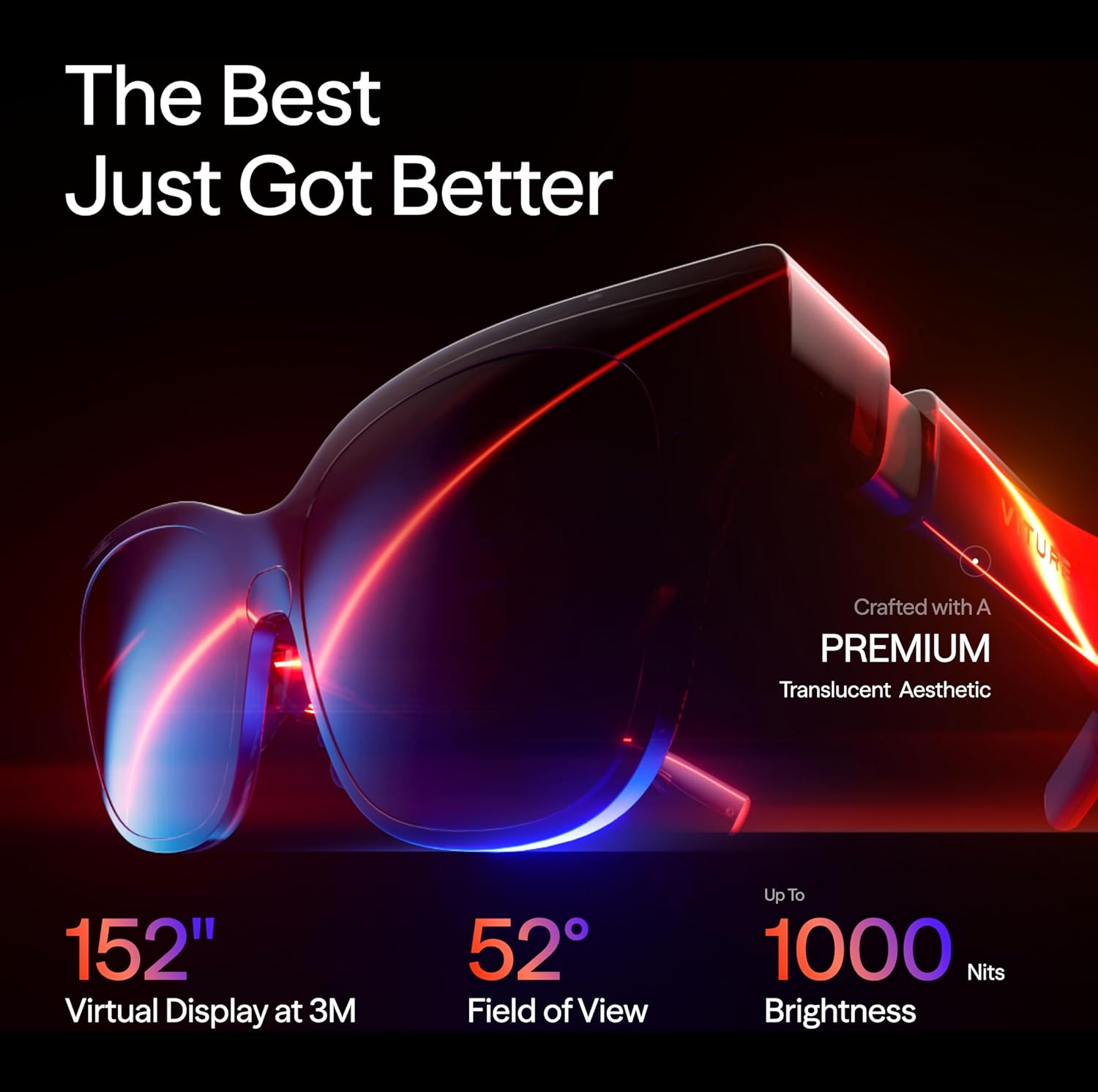
The first thing that hit me is the image clarity. The 1200p per eye and 120Hz combo does look sharp, especially for movies and text. It doesn’t feel like a real 152” TV, but it does feel like sitting fairly close to a big projector screen. Colors are good, brightness is strong enough indoors and even near a window, and I never felt like I was squinting to read menus or subtitles.
Where the honeymoon cooled off was the software and compatibility side. On my Windows laptop, it took a bit of messing around with SpaceWalker and display settings to get the multi‑screen stuff usable. On Android, it was even more hit and miss. When it works, it’s genuinely handy; when it doesn’t, you’re basically stuck with a big mirrored screen and some frustration.
Overall, my feeling is: this is great for media and casual gaming, decent for occasional work, and not yet the magical laptop‑replacement setup some YouTube reviewers made it sound like. If you’re mainly buying it as a travel cinema or handheld console screen, you’ll probably be happy. If you’re buying it only for productivity and head‑tracked three‑screen setups, I’d say manage your expectations or wait for the software to mature.
Value: great if you want a travel cinema, less so if you expect a full workstation
Price‑wise, these sit in that slightly painful zone: not cheap, not ultra‑luxury either. I picked them up with a discount, and at that price, I felt the value was pretty fair for what I actually use: a sharp, private big screen for travel and late‑night gaming. At full retail, it’s more of a question mark, especially if you’re mainly attracted by the productivity and multi‑screen promises.
If your main use cases are: watching movies on flights, playing on Steam Deck or Switch without hogging the TV, and occasionally plugging into a laptop for a bigger screen in a hotel room, then yeah, the glasses start to make sense. They basically replace the idea of carrying a portable monitor and headphones. In that context, the price feels high but justifiable, especially if you travel a lot or live in a small space.
But if you’re eyeing them purely as a laptop replacement or productivity powerhouse, I’d be more cautious. The SpaceWalker multi‑screen stuff works, but it’s not rock solid, and there are still bugs and compatibility gaps, especially on Android and Windows. Some people will be fine with tinkering and dealing with the occasional crash. Others will be annoyed that something this expensive doesn’t just plug in and work perfectly every time.
Also factor in extras: if you’re far‑sighted, you might have to buy the magnetic prescription inserts. If your phone doesn’t output video properly, you might need a different device or extra adapters. All of that adds to the bill. So in terms of pure value: strong for media fans and handheld gamers who know their devices are compatible, average for productivity‑focused buyers who don’t want to fiddle with software and settings.
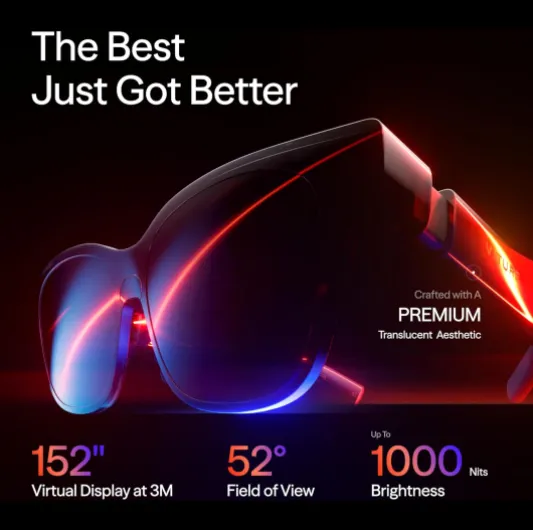
Design: looks like tech glasses, not fashion glasses
Design‑wise, the Luma Pro sits somewhere between regular sunglasses and obvious nerd gear. They’re not huge VR goggles, which is nice, but nobody will mistake them for normal Ray‑Ban style shades either. The frame is a bit chunky, especially around the temples where all the electronics and speakers live. I wouldn’t wear these walking down the street trying to be discreet, but on a plane, train, or couch, they’re fine.
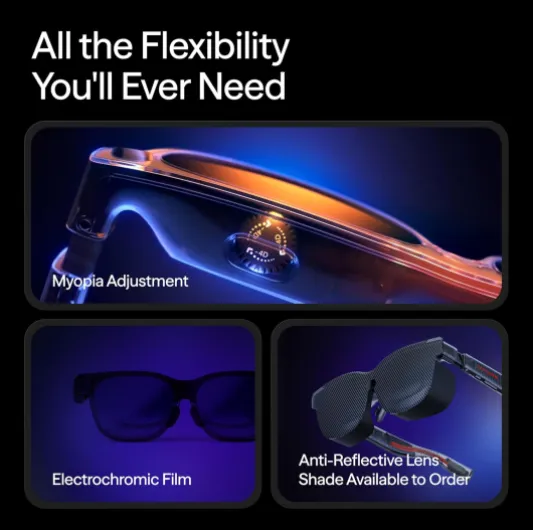
The translucent frame and dynamic light effects are very "gamer". Personally, I don’t care about RGB on my face, but if you like that kind of thing, you’ll probably enjoy the little light animations. Right now it’s more of a cosmetic bonus than anything functional. The adjustable electrochromic film is more useful: tap the button and the lenses darken, so you don’t need a clip‑on shade in most situations. It’s quick, and it actually helps when you’ve got bright ambient light behind the screens.
Controls are spread over the arms: you’ve got buttons for brightness, dimming, and some basic interactions. They’re small but clicky enough once you memorize where everything is. On top of the frame are the myopia adjustment dials for each eye, which is a nice touch. They’re easy to move but stiff enough that you won’t bump them by accident once set. The downside: if you’re far‑sighted instead of near‑sighted, these dials don’t help you; you’ll need prescription inserts.
Overall, the design is functional rather than pretty. It’s clearly built around packing in optics, speakers, and sensors first, style second. I didn’t feel silly wearing them in a plane seat or at home, but I wouldn’t wear them in a café for hours if I cared how I looked. For a first‑and‑foremost tech product, I’d say the design is practical but not stylish. It gets the job done and doesn’t fall apart, but no one is buying these as a fashion accessory.
Battery and power: depends mostly on your device
The glasses themselves don’t have a big internal battery like a VR headset; they draw power from whatever they’re plugged into. That means your phone, Steam Deck, or laptop battery becomes the limiting factor. In practice, this is both good and bad. Good because you don’t have to remember to charge the glasses separately; bad because they’ll drain your main device faster.
On my Steam Deck, running games with the Luma Pro connected shaved roughly 20–30% off my usual playtime compared to using the built‑in screen. That’s not shocking since you’re driving an external display plus whatever overhead there is. On my Windows laptop, the hit was noticeable but less painful, since I’m usually plugged in or near a socket anyway. For phones, it’s where you feel it most: long streaming sessions will chew through your battery faster than just watching on the phone screen.
VITURE sells extra accessories like a neckband and power brick to offload some of this, but out of the box, you’re living off your host device. If you plan to use these heavily on flights, I’d strongly recommend bringing a decent power bank or being ready to plug into the seat power if available. The glasses themselves never died on me, obviously, but I did end up baby‑sitting my Steam Deck battery more than usual.
One plus: because there’s no big internal battery, the glasses stay cooler and lighter. They never got uncomfortably warm on my face, even after a few hours. So from a comfort perspective, this design choice makes sense. Just don’t buy them expecting them to be a self‑powered headset. Think of them like a fancy, head‑mounted external monitor that runs off whatever you plug in.

Comfort: good for long movies, not weightless but fine
Comfort was one of my bigger concerns before trying these. They weigh about 81 g, which is more than regular glasses but way less than a full VR headset. After a few sessions, I’d say comfort is one of the stronger points, with a couple of caveats. I watched two full movies back‑to‑back (around four hours total) and didn’t end up with a sore nose or aching ears, which is already better than some cheaper XR glasses I’ve tried.
The nose pads make a big difference. They’re magnetic and swappable, so you can try different sizes and shapes. Once I found the right one, the frame sat in a stable position without sliding down every 10 minutes. The arms have some flex, so they grip your head without clamping too hard. That said, if you already wear prescription glasses and have to stack them, it gets awkward quickly. For near‑sighted people, the built‑in myopia adjustment is great and removes that issue; for far‑sighted users, you basically need to pay extra for prescription inserts.
In terms of eye comfort, the high brightness and clarity help. Text is sharp enough that I didn’t get headaches from trying to read small fonts. The 120Hz refresh rate also helps reduce strain compared to 60Hz panels. Still, after around three hours of mixed use (movies + browsing), I did feel like I needed a short break. It’s still a screen right in front of your eyes, so it’s not magic. If you’re sensitive to screens, don’t expect miracles.
Walking around with them is doable, especially with the electrochromic film off or set lighter, but I wouldn’t call it natural. You’re aware you’re looking through a digital overlay, and there’s some edge distortion. For standing up, grabbing a drink, or going to the bathroom on a plane, it’s fine; for actual walking outdoors, I just take them off. Overall, for sitting use (sofa, desk, airplane seat), the Luma Pro is comfortable enough for long sessions if you take the time to adjust the pads and angle properly.
Durability and build: solid enough, but still tech you’ll baby
Build quality feels decent for the price bracket, but this is still the kind of gadget you’ll want to treat carefully. The frame has a bit of flex but doesn’t creak when you twist it lightly. The hinges feel okay, not luxury, but not cheap toy level either. I tossed them in my backpack in their case a few times, and they came out fine, no scratches or misalignment.
The lenses and front surface are the parts I’m most careful with. There’s a camera/sensor area in the center with a protective film you have to peel off before first use. Once that’s off, I kept wiping the lenses with a microfiber cloth and tried not to touch them with my fingers. They don’t feel fragile, but I wouldn’t trust them loose in a bag or pocket. If you’re rough with your stuff, you’ll want to be extra mindful here.
The cables and connectors are standard USB‑C, which is nice. You’re not locked into one proprietary cable, though I’d still stick with decent‑quality ones because a flaky cable can look like a glasses problem. After two weeks, I didn’t notice any loosening of the ports or weird behavior when moving my head, so the internal connections seem fine so far.
Long term, I can’t judge yet, but based on the materials and feel, I’d say they’re sturdy enough for normal daily use if you keep them in their case when not in use and don’t sit on them. They’re not rugged, not something I’d throw around or hand to kids, but they don’t feel like they’ll fall apart after a month either. Typical “expensive electronics” level: good, but you still treat them with respect.
Performance: picture is strong, software is the weak link
Let’s split performance into two parts: display/audio hardware and software/compatibility. On the hardware side, I’m impressed. The 1200p resolution looks very sharp at the perceived distance. Text in Windows, code editors, and browser tabs is readable, not fuzzy. The 52° FOV feels like sitting in front of a large monitor rather than being fully surrounded, which I actually prefer for work. The 120Hz refresh rate makes mouse movement and scrolling feel smooth, especially in games and desktop use.
Brightness is genuinely good. At 1000 nits, it holds up even with some daylight in the room. I didn’t test in direct sunlight, but near a window it stayed usable. Colors look balanced out of the box; I didn’t notice any weird tint. For movies like The Matrix and animated stuff, contrast and color pop nicely without looking cartoonish. I wouldn’t use this for professional color grading, but for normal viewing, it’s more than enough.
Now the software side. This is where things get messy. On Windows with SpaceWalker, the multi‑screen feature works, but it’s not bulletproof. Sometimes windows drift a bit or the tracking feels off, and occasionally the app just decides to act up and you need to restart it. It’s usable, but I wouldn’t rely on it in a time‑critical work situation. On Android, it really depends on the phone. With some devices, SpaceWalker works decently; with others, you run into crashes, no head tracking, or the app refusing to cooperate. If you’re not on a recent iPhone or a well‑supported Android, expect some trial and error.
Gaming performance over Steam Deck and PC is solid because the glasses are basically just a high‑refresh external display. Input lag is more about your device than the glasses. I played some indie titles and a couple of shooters and didn’t feel held back by latency. So overall: hardware performance is strong, software and platform support are patchy. If your setup is on their compatibility list and you’re okay with occasional glitches, you’ll be fine. If you hate tinkering with apps and settings, this might annoy you.
What you actually get with the Luma Pro
On paper, the VITURE Luma Pro is loaded: 1200p resolution, 120Hz refresh rate, 52° FOV, up to 1000 nits brightness, Harman‑tuned speakers, electrochromic dimming, and a bunch of software tricks like SpaceWalker and real‑time 2D‑to‑3D conversion. In practice, the core experience is a sharp virtual monitor that plugs into pretty much anything with USB‑C video out or via adapters: phones, Steam Deck, Switch (or Switch 2 when that’s out), laptops, etc.
My use cases were simple: plug into Steam Deck and laptop, and occasionally my Android phone. For Steam Deck, it behaved almost like a regular external display: plug in, screen appears, done. For Windows, you get the option to use SpaceWalker, which tries to give you up to three virtual screens. It looks cool at first but needs some tweaking to feel reliable. On Android, the experience depends heavily on the specific phone and how it handles video out and the SpaceWalker app.
The 2D‑to‑3D conversion is one of those “nice to try once” features. It works, but it’s more of a novelty than something I’d use daily. Sometimes it adds depth; other times it just feels like processed video without much real benefit. I wouldn’t buy these glasses for that alone. The marketing leans hard on this and on the multi‑screen workspace, but the actual day‑to‑day value for me came from the simple stuff: one big clear screen and built‑in audio.
So if you strip away the buzzwords, what you’re left with is: XR glasses that behave like a good portable monitor with some extra software tricks that are occasionally useful, occasionally annoying. The hardware side mostly delivers; the software side feels like a work in progress, especially if you’re not in Apple’s ecosystem.
Pros
- Very sharp, bright 1200p/120Hz virtual screen that’s great for movies and gaming
- Comfortable enough for multi‑hour sessions with adjustable nose pads and myopia dials
- Works well as a simple external display for devices like Steam Deck, Switch, and laptops
Cons
- Software (SpaceWalker, head tracking, 3‑screen mode) is buggy and inconsistent on Windows/Android
- Value is weaker if you mainly want it for productivity rather than media
- Far‑sighted users likely need to pay extra for prescription inserts
Conclusion
Editor's rating
After using the VITURE Luma Pro XR Glasses across a few devices, my take is pretty simple: as a portable personal cinema and gaming screen, they’re genuinely good; as a serious productivity tool, they’re still rough around the edges. The hardware mostly delivers: image is sharp, 120Hz feels smooth, brightness is strong, and the built‑in Harman audio is better than I expected for tiny speakers in the arms. Comfort is solid once you dial in the nose pads, and the myopia adjustment is a real plus for near‑sighted users.
Where things fall short is on the software and compatibility side. SpaceWalker and the multi‑screen/head‑tracking stuff can work, but it’s not plug‑and‑play on every Windows or Android device. Some people will have no issues; others will run into crashes, missing features, or basic things like head tracking not working at all. If your main goal is to replace a multi‑monitor setup for work, I’d treat that as an experiment, not a sure thing.
Who should buy this? People who travel a lot, watch a ton of movies or series, and game on Steam Deck, Switch, or similar gear will probably be happy, as long as their devices are confirmed compatible. Who should skip it? Anyone who hates troubleshooting, or who wants a guaranteed smooth productivity setup with perfect head tracking and rock‑solid software. In short: great media and gaming glasses with promising but imperfect extras.