Summary
Editor's rating
Is it worth the money, or are you just paying for a fancy wall toy?
Looks and physical design: modern enough, but a few install quirks
Build quality, heat, and long‑term feel
Daily performance: does it actually run your smart home properly?
What this thing actually does, beyond the marketing buzzwords
Does it really centralise your smart home, or just add another screen?
Pros
- Combines Zigbee hub, Matter bridge, 2‑channel relay, and wall control panel in one device
- Strong Home Assistant integration and support for multiple ecosystems (Alexa, Google, Apple Home)
- Responsive screen, reliable proximity sensor, and stable Zigbee performance in daily use
Cons
- High price compared to simpler thermostats or separate budget components
- Initial setup and configuration are time‑consuming and not very beginner‑friendly
- Mounting screws and wall box compatibility can be finicky, especially in some UK installations

Specifications
View full product page →| Brand | SONOFF |
A wall tablet that actually replaces stuff, not just decorates your wall
I’ve been playing with the SONOFF NSPanel Pro Gen2 with Relay for a bit, and it’s very much a “tinkerer’s toy that can pass as a family‑friendly wall switch”. On paper it does a lot: Zigbee 3.0 hub, Matter bridge, 2‑channel relay, thermostat, alarm panel, Home Assistant screen, plus dual‑band Wi‑Fi. In practice, it really can replace a dumb 2‑gang wall switch, a Zigbee dongle, and that old tablet you’ve taped to the wall. But it’s not plug‑and‑play like a simple thermostat from the DIY store.
The first thing that hit me is the price. Around £120–130 for a wall panel is not cheap, especially when you can buy a basic smart thermostat or a cheap Android tablet for less. So I went in with the mindset: if this doesn’t let me remove at least two or three other devices, it’s not worth it. After installing it in the hallway to replace a double light switch, I did actually unplug my separate Zigbee coordinator and retired a small 7" tablet that was running Home Assistant. So on that point, it delivered.
However, it’s not perfect. The setup took me an evening: firmware updates, pairing with eWeLink, adding it to Home Assistant, then re‑adding my Zigbee sensors. If you hate fiddling with apps and menus, this will annoy you. Also, some small but real annoyances show up, like the screws not matching UK pattresses for some users, and documentation that assumes you already know your way around Sonoff gear.
Overall, my first impression is: pretty solid bit of kit if you’re already into smart home stuff and want a central panel on the wall. If you just want to turn the heating up and down without touching your phone, there are cheaper and simpler options. This one is more for people who like to tweak scenes, sensors and dashboards.
Is it worth the money, or are you just paying for a fancy wall toy?
Let’s talk money, because that’s really where opinions split. At around £120–130, the NSPanel Pro Gen2 is not cheap. You’re in the same price range as a decent basic tablet plus a separate Zigbee hub. So you have to look at what you’re actually getting: a permanent wall‑mounted control point, a Zigbee 3.0 coordinator, a Matter bridge, and a 2‑channel relay that replaces a dumb switch. If you take advantage of all of those, the price starts to make sense. If you only use it as a pretty light switch, it’s overpriced.
Compared to buying separate bits, here’s roughly how I see it:
- Cheap tablet on the wall: £60–80
- Zigbee USB stick/hub: £20–40
- Smart 2‑gang relay switch: £20–30
Put that together and you’re already in the £100 range, with more cables, more plugs, and something that looks a lot messier. So in that sense, the NSPanel Pro Gen2 is not a bargain, but not completely unreasonable either. You’re paying a premium for integration and a cleaner solution.
Where it loses a bit on value is the setup effort and learning curve. If you’re the kind of user who wants to screw it in, tap twice, and be done, you’ll be frustrated. You pay a high price and still have to babysit firmware updates, pair devices, and tweak Home Assistant. For a casual user, that doesn’t feel like great value. For someone already deep into Home Assistant or Sonoff gear, that time is just part of the hobby, and then the panel feels like a natural upgrade.
So from a value point of view, I’d rate it as good but not outstanding. It gets the job done and consolidates hardware, but only really shines if you exploit the Zigbee + Matter + Home Assistant combo. If your smart home is minimal, your money is probably better spent on a simpler thermostat or a couple of good smart switches and keep using your phone as the main controller.
Looks and physical design: modern enough, but a few install quirks
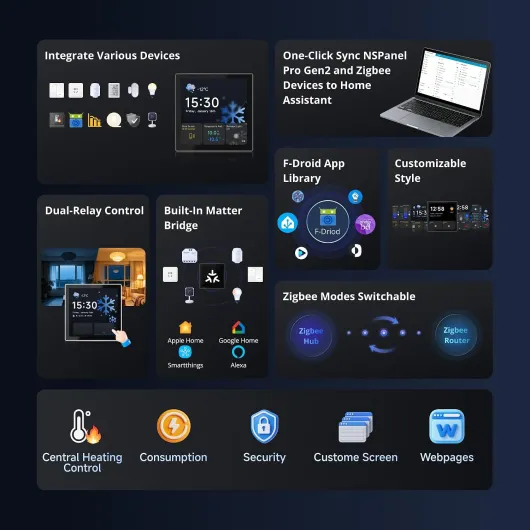
Design‑wise, it’s pretty straightforward: a white, square-ish panel (about 8.6 x 8.6 cm) with a black touch screen in the middle. It’s modern but not flashy. On the wall it looks a bit like a small thermostat or a high‑end light switch. The matte plastic frame doesn’t scream luxury, but it also doesn’t look cheap or glossy toy‑like. For a hallway or living room, it blends in fine. If you’re expecting brushed aluminium and glass, that’s not what this is.
The screen itself is decent. Bright enough to read comfortably in daylight, with good touch response. I didn’t have to stab it multiple times to get a press registered, which is important when you’re half‑asleep trying to turn on the light. The proximity sensor is a nice touch: as you walk toward it, the screen wakes up before you actually raise your hand. In practice, this means the panel feels more like a real control point and less like a dead tablet that you have to wake up every time.
Where the design gets a bit annoying is the backside and mounting. It’s meant to go in a standard wall box, and electrically that’s fine, but the supplied screws aren’t ideal for UK pattresses according to at least one buyer, and I had to dig into my own screw box to get a comfortable fit. Not a big drama if you’re used to DIY, but if you expected “unscrew old switch, pop this in, done”, you might be swearing at the wall for a bit. Also, the depth is okay but not tiny, so if your box is shallow and already full of wires, you’ll need to tidy things up.
Overall, I’d say the design is practical and pretty clean, not a showpiece. Once mounted, it sits fairly flush and doesn’t wobble. The white frame hides fingerprints better than glossy black, and the screen doesn’t collect smudges as badly as a smartphone. It looks like what it is: a smart control panel, not a piece of art. For me that’s fine; I care more about it being readable and solid on the wall than about impressing guests with materials.
Build quality, heat, and long‑term feel
I obviously haven’t had this panel for years, so I can’t pretend to know how it will age, but there are a few durability clues you can pick up pretty quickly. First, the plastic housing feels solid, with no creaks when you press on the frame. Once screwed into the wall box properly, it doesn’t wobble or flex. I’ve had cheaper smart switches where the faceplate moved every time you tapped it; this one feels more like a proper fixed device.
Heat is usually a good indicator for wall electronics. After running it for several days non‑stop, with the screen set to a reasonable brightness and Wi‑Fi + Zigbee active, the panel gets warm but not worrying. You can touch the frame and screen without any discomfort. Given it’s only rated at 5 W and uses a decent Zigbee chip (EFR32MG24), that’s about what I expected. I haven’t noticed any weird reboots or crashes, which is often a sign of heat issues in cheaper gear.
The touchscreen also seems fine so far. No dead zones, no ghost touches. It’s not as tough as a phone screen, obviously, but it’s also not in your pocket with keys and coins. I wiped it with a microfiber cloth a few times; no scratches yet. For a wall panel that people poke a few times a day, I don’t see a big risk there unless someone goes at it with a screwdriver.
The only durability concern I’d flag is more on the software and ecosystem side. These products live or die by firmware updates and app support. Sonoff has a decent track record, but you are still tied to their choices for features and bug fixes. The good news is that because it plays nicely with Home Assistant and Matter, you’re less locked in than with a pure proprietary panel. If Sonoff slows down updates later, you can still lean more on Home Assistant and keep the hardware useful. Physically though, the device feels like it will hold up fine as a permanent fixture.
Daily performance: does it actually run your smart home properly?
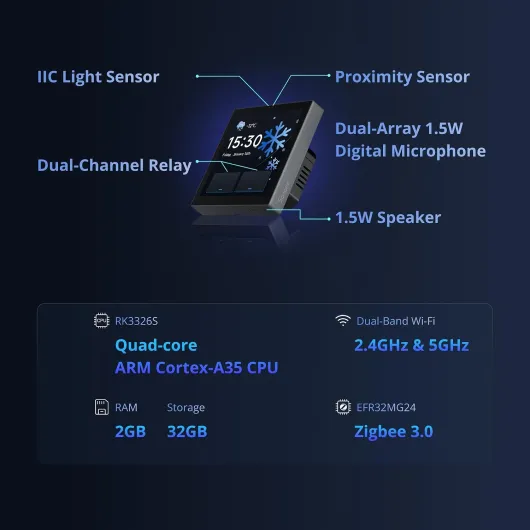
Performance is where this panel actually justifies a good part of its price. With 2 GB of RAM and 32 GB of storage, I was expecting something borderline for Android apps, but for a fixed wall panel, it’s fine. The built‑in interface runs smoothly, screens change fast enough, and launching a Home Assistant dashboard or another sideloaded app through F‑Droid doesn’t feel painfully slow. It’s not a flagship phone, but it’s perfectly usable for tapping scenes and checking temperatures.
The Zigbee hub part worked better than I expected. I migrated a bunch of sensors (door, motion, temperature) and a few bulbs. Pairing them was straightforward, and once paired, they stayed connected. No random drop‑outs so far. Response time when toggling a Zigbee light from the panel is basically instant. I also liked that the panel itself exposes entities cleanly to Home Assistant, so I could use its relays and sensors in my existing automations without weird hacks.
On the Matter bridge side, it does what it says, but you need patience the first time. Adding devices to Apple Home and Google Home from Zigbee through the panel took several steps, and the instructions are a bit light. Once set up, though, it behaved. I could ask Google to control Zigbee lights that are technically hanging off this panel, and they responded as if they were native. That’s exactly the kind of boring reliability you want from this type of device.
As for the relays, they are the safety net. Even if the software is having a bad day, you still have actual physical switching for your circuits. I wired one relay to the main hallway light, and even when I was messing with firmware updates, the basic on/off control still worked. That’s important if you live with people who don’t care about your smart home experiments and just want the lights to work. Overall, performance is pretty solid: not the fastest gadget ever, but responsive and stable enough that I trust it to be the main control point.
What this thing actually does, beyond the marketing buzzwords
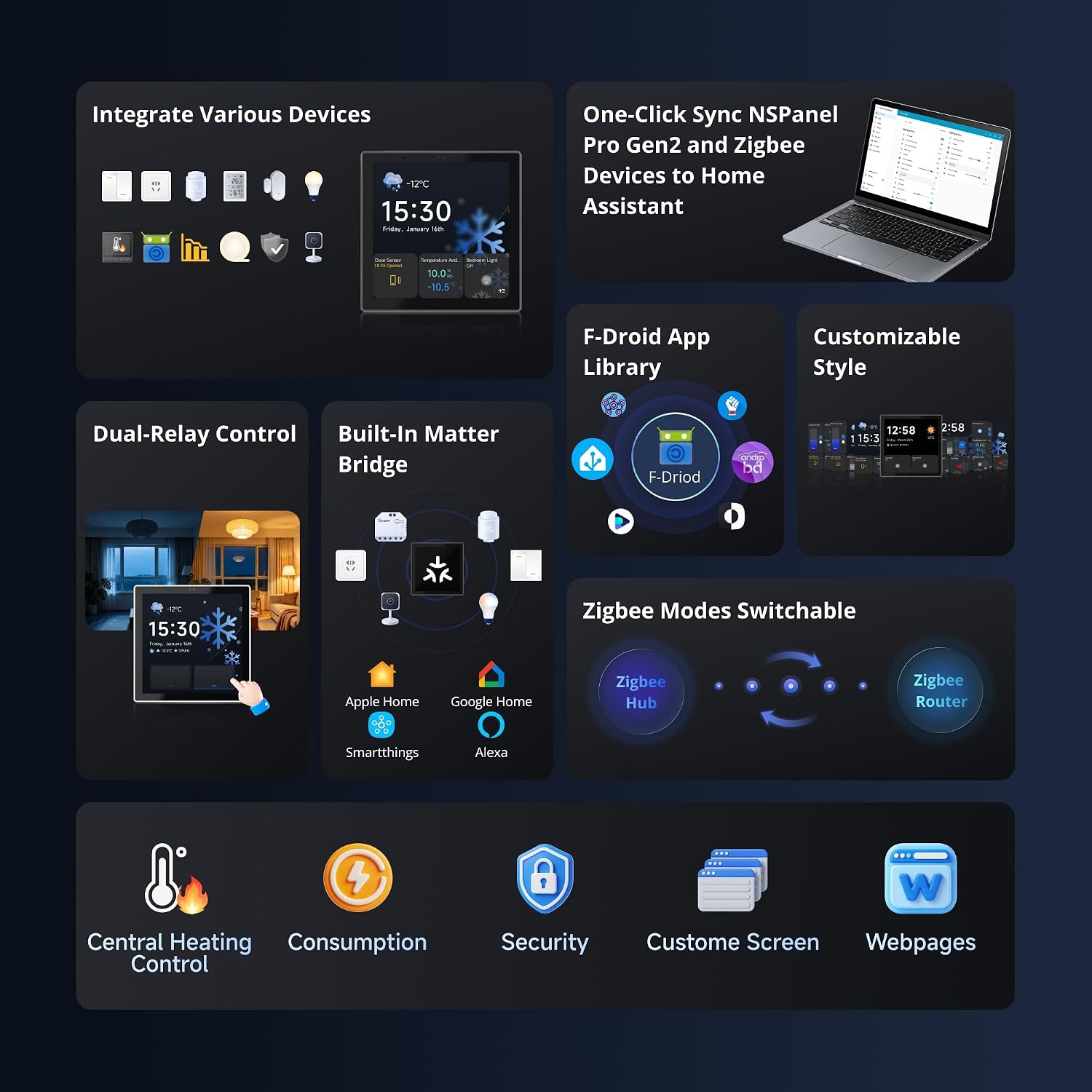
On the spec sheet, the NSPanel Pro Gen2 looks like a Swiss Army knife. You get: a 3.95" touch screen, a built‑in Zigbee 3.0 hub, a Matter bridge, dual‑band Wi‑Fi (2.4 and 5 GHz), 2‑channel relay, temperature sensor, proximity sensor, microphone, and enough RAM/storage (2 GB / 32 GB) to run a few Android‑based apps via F‑Droid, including a Home Assistant dashboard. So, it’s not just a fancy remote; it’s basically a little always‑on wall tablet with extra radios and relays.
In day‑to‑day use, the main point is centralisation. I wired the two relays to control my hallway light and a secondary circuit, then paired some Zigbee sensors (door contact and motion) and a couple of smart bulbs. From the panel, I can now see temperature, arm a basic alarm mode, trigger scenes (like “all lights off” or “night mode”), and check camera feeds through integrations. This is the spot in the house where everyone passes, so it actually gets used by other people, not just me with my phone.
The Matter bridge and Zigbee hub parts are what give it long‑term value. Instead of having a separate Zigbee USB stick on a mini‑PC, I just let this panel be the coordinator. It discovered my existing sensors without much drama, and I could then expose them to Apple Home or Google Home via Matter. It’s not magic, you still have to click through a bunch of menus, but once done, it works and stays stable. I haven’t had to re‑pair things every other day, which is key.
So, in presentation terms: it’s basically a compact smart home hub + wall switch + control tablet in one box. It doesn’t replace a full‑blown server like a NUC running Home Assistant, but it does cut down the number of boxes, dongles, and chargers lying around. If your smart home is a mess of apps and bridges, this at least gives you one consistent place to control and view stuff.

Does it really centralise your smart home, or just add another screen?
In terms of effectiveness, the big question for me was: does this reduce the number of devices and apps we actually use, or is it just another gadget? After a couple of weeks, I’d say it genuinely helps centralise things, but only if you lean into its ecosystem a bit. I replaced a regular 2‑gang switch, a Zigbee USB stick, and a cheap wall‑mounted tablet. So physically, yes, it cut clutter. The family now uses this panel to adjust heating, turn scenes on/off, and check if the alarm is armed, instead of asking me or hunting for their phones.
As a thermostat and environment monitor, it’s decent. The temperature readings are consistent with my other sensors, and you can create heating/cooling scenes that trigger via Home Assistant or the Sonoff app. It’s not as straightforward as a Nest or Tado from a pure heating perspective, because the strength here is more about integrating everything rather than just managing your boiler. If all you want is simple temperature control, this is overkill. But if you already have smart valves, temperature sensors, and automations, having them all visible and tweakable from this one screen is very handy.
The security and alarm features are basic but useful. You can arm/disarm, see sensor status, and show camera feeds. It’s not a professional alarm system replacement, but for a home where you already have Zigbee door and motion sensors, it gives a clear, central view of what’s going on. I found it much more natural to check the panel on the way out than to open an app every time. Again, it’s about being at the right physical spot in the house.
So, does it add value? For me, yes, because it shifts control from phones to a shared, fixed point. That said, if you’re not going to use the Zigbee hub, the Matter bridge, or Home Assistant integration, then you’re paying a lot for features that will sit idle. In that case, it’s just an expensive light switch with a fancy screen. The more devices and platforms you plug into it, the more it earns its place.
Pros
- Combines Zigbee hub, Matter bridge, 2‑channel relay, and wall control panel in one device
- Strong Home Assistant integration and support for multiple ecosystems (Alexa, Google, Apple Home)
- Responsive screen, reliable proximity sensor, and stable Zigbee performance in daily use
Cons
- High price compared to simpler thermostats or separate budget components
- Initial setup and configuration are time‑consuming and not very beginner‑friendly
- Mounting screws and wall box compatibility can be finicky, especially in some UK installations
Conclusion
Editor's rating
The SONOFF NSPanel Pro Gen2 with Relay is a solid all‑in‑one panel for people who are already fairly invested in smart home stuff. It genuinely can replace a double wall switch, a Zigbee hub, and a basic wall‑mounted tablet, which cleans up both your wall and your wiring. Performance is stable, the Zigbee and Matter features work as advertised once set up, and the Home Assistant integration is a big plus if you like to build more advanced automations. As a central hallway or living room control point, it makes sense and actually gets used by the whole household.
It’s not for everyone, though. The price is on the high side, the initial configuration takes time and patience, and the documentation assumes you’re not a complete beginner. If all you want is a simple thermostat or a single‑brand smart switch setup, this is overkill and not great value. Also, little details like screw compatibility in UK pattresses can be annoying if you’re expecting a totally painless install. In short: great for tinkerers and Home Assistant users who want a neat wall panel, decent but maybe too expensive for casual users who are fine just using their phones.